

New York

11–100

Technology
How Synup used Klenty to help their sales team reach up to 140% of their monthly target.
Teams using Klenty
SDRs, AEs

Simplified multi-step sales processes

Enabled AEs to engage 50–60 leads/month

Personalized outreach using account context

Engaged hot leads via calls & LinkedIn
Challenges
Lack of automation slowed sales processes
Salesloft–Zoho integration limitations
High platform costs reduced ROI
About Synup
Synup is a location intelligence tool that helps businesses with their local marketing, discovery, and engagement. Businesses and agencies alike can use Synup to get listed online, monitor online reputation, generate business reviews, and track search engine analytics.
Synup’s Sales Outreach Situation
At Synup, pipeline generation happened through three motions:
Outbound Motion - SDRs run multi-channel cadences to cold prospects. Each SDR is assigned a set of accounts every month, and they are responsible for generating new opportunities by engaging these accounts.
Inbound Motion - Account Executives handle around 50–60 inbound leads per month. If a lead does not book a demo automatically, it gets added to a cadence for manual follow-up. Timely follow-up is critical to create opportunities and hit revenue goals.
Closed-Lost Motion - AEs re-engage past opportunities by importing conversation history and sending personalized touchpoints to revive stalled deals.
The Klenty Difference
Simplified multi-channel cadence management
Native Zoho CRM integration
High-intent lead prioritization
High ROI at optimal cost
Favorite Features
Multi-Channel Cadences
High Intent Detector
Number Rotation
Import Conversation History

Challenge
Because of these three motions, the sales team needed a sales engagement platform that was flexible, easy to use, and for reps to adopt and live in every day.
The team was running their outbound operations on Salesloft. However, their existing tech stack created several challenges. They had recently switched to Zoho CRM, but Salesloft did not integrate well with Zoho.
Reps were forced to update records manually and double-check activities across systems. Instead of spending time on conversations with prospects, they lost hours fixing sync issues.
Cost also became a major concern. As the team expanded, Salesloft’s pricing became harder to justify. The ROI didn’t hold up.
This pushed the team to search for a new sales engagement platform that could integrate with Zoho while delivering the functionality they needed.
Criteria For Choosing a Sales Engagement Platform
When evaluating alternatives, Synup’s team wanted a platform that could match SalesLoft’s core capabilities while being easier to adopt and more cost-effective. Their main criteria included.
1. Multi-Channel Outreach With Automation
They needed a platform that could handle email, calls, and LinkedIn from one place, enabling reps to build personalized cadences and reach prospects consistently without manual follow-ups.
2. Integration With Zoho CRM
Since Synup’s team relied heavily on Zoho, they required a native integration that would automatically sync contacts, activities, and deal updates, helping SDRs and AEs maintain full visibility into every touchpoint.
3. Better Value For Money
While SalesLoft offered the right functionality, the cost was high. Synup wanted the same feature depth: multi-channel sequences, dialer, and CRM integration, at a more reasonable price point.

Solution
That’s where Klenty came in.
Here’s why they onboarded their whole sales team onto Klenty.

Outbound Motion
The team wanted a solution that would allow them to upload contacts quickly, launch personalized multi-channel cadences, prioritize the most engaged prospects in real-time, and maintain consistency without losing context.
Essentially, SDRs needed to spend more time talking to prospects and less time managing data.
How Klenty Supported This Workflow
Klenty enabled the SDR team to execute this ideal workflow efficiently.
Contact lists from each account could be imported into Klenty right from Zoho CRM, eliminating manual work and ensuring that no leads were missed.
Multi-channel sequences were then automatically launched, covering emails, calls, and LinkedIn messages while allowing personalization for each account.
High Intent Detector surfaced the most engaged prospects in real time, allowing SDRs to focus their efforts on leads most likely to convert.
Based on this engagement data, Klenty automatically suggested the best next actions for each lead, whether that meant reaching out immediately, sending a follow-up, or nurturing the prospect, helping the team capture new opportunities and revive previously stalled ones.
Capabilities That Drove The Outbound Motion
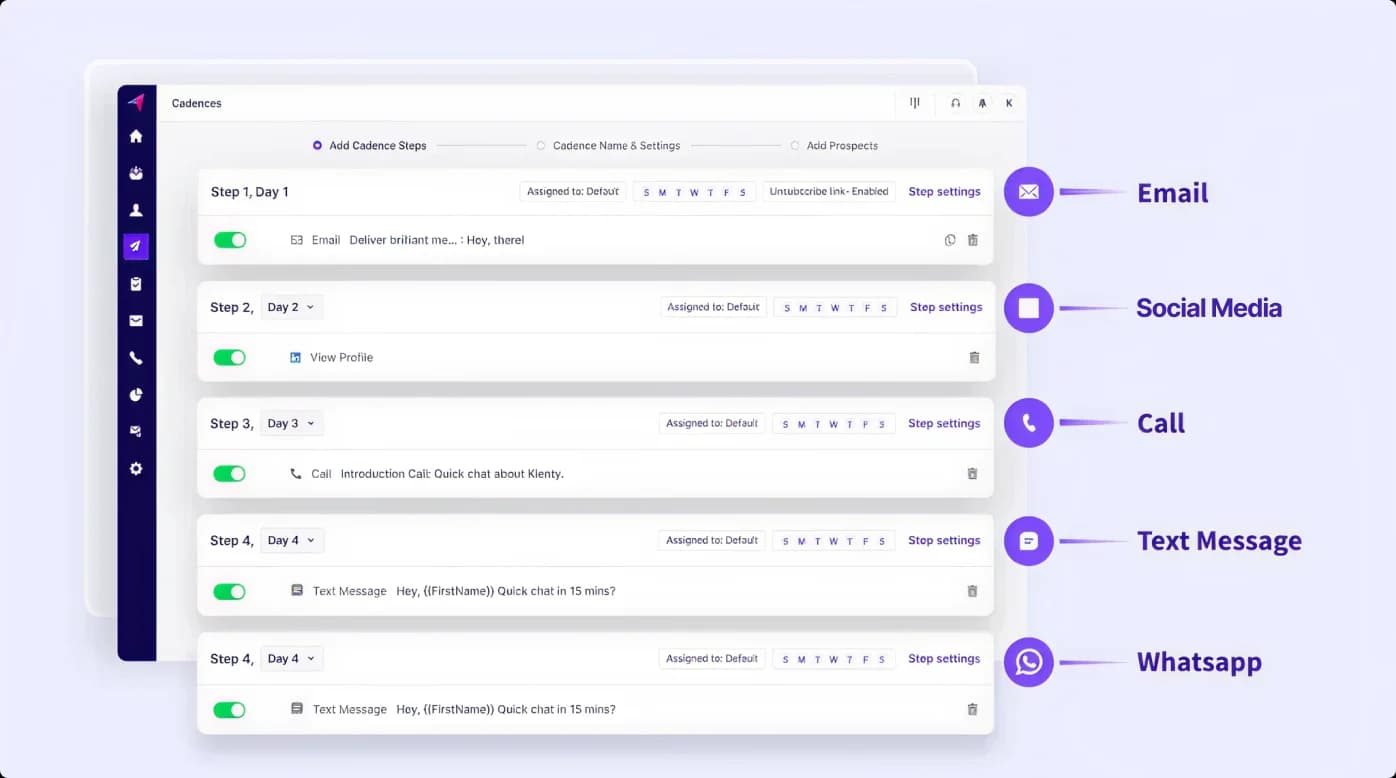
1. Multi-Channel Cadences
Engage prospects with multi-channel cadences that include emails, calls, LinkedIn, and texts. Use the right channel to increase meetings booked.
Cadences automate the flow of touches across channels while still enabling personalization.
Together with Hot Leads and Playbooks, cadences give structure to outreach and ensure high-intent prospects don’t slip through the cracks.

"I think when it comes to creating cadences and running outreach, Klenty is very easy to use. That’s what I feel is Klenty’s biggest USP, its simplicity."
2. AI Playbooks
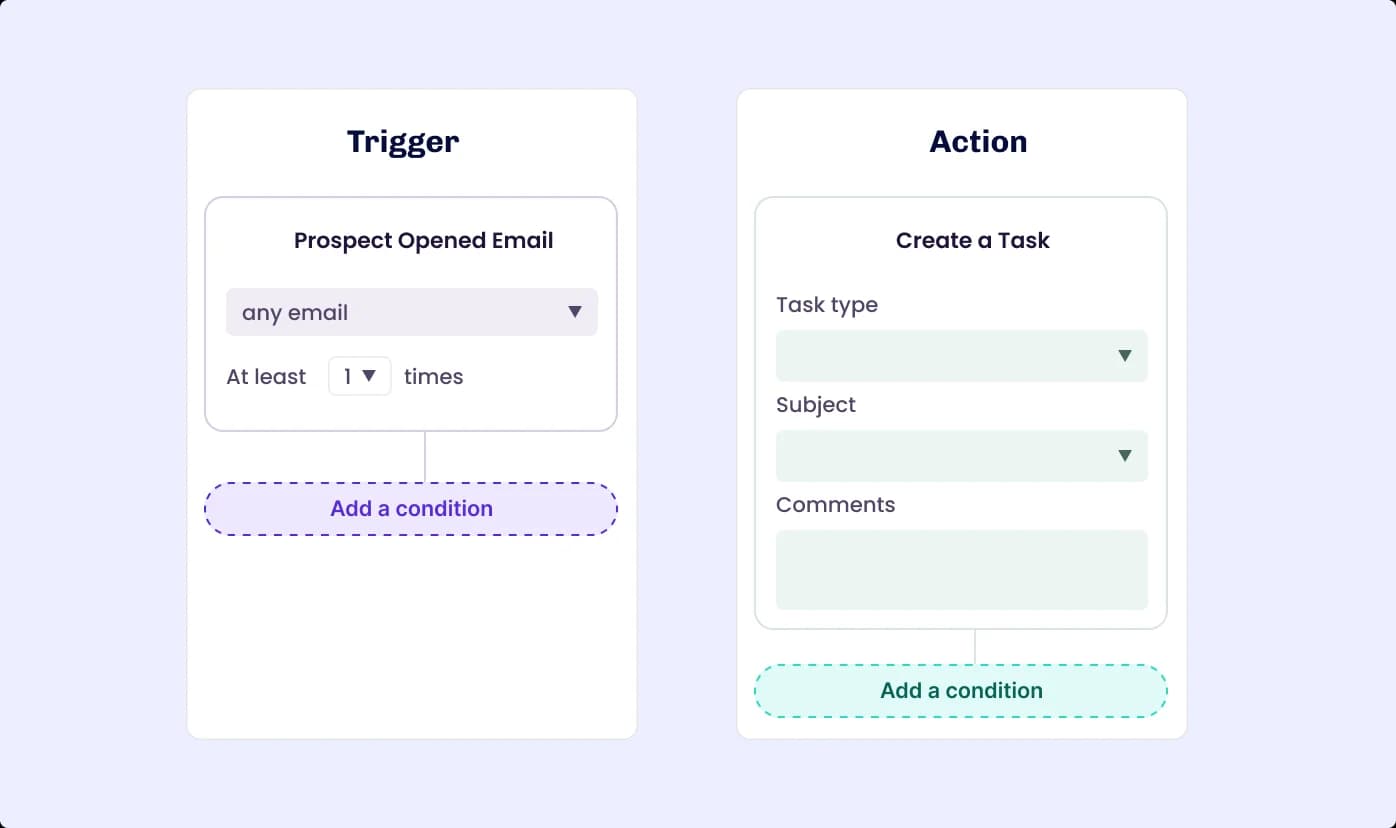
AI Playbooks helps you classify prospects based on intent, automatically send prospects to different cadences, and prioritize high-intent prospects.
This allows reps to follow the best next steps without guesswork. In combination with Hot Leads, Playbooks dynamically direct attention toward the prospects most likely to convert.
3. Hot Lead Notifications
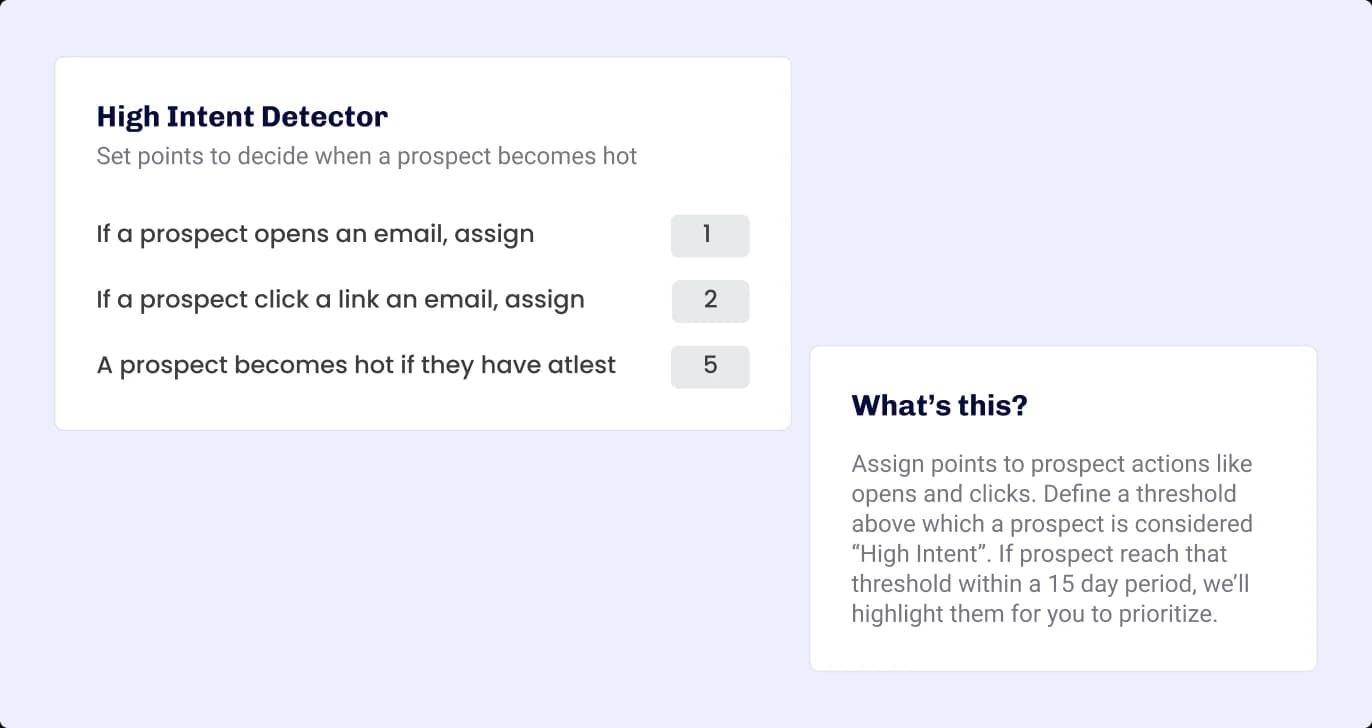
Hot Leads functionality notifies users of their most highly engaged prospects so that they can prioritize one-to-one engagement efforts.
By analyzing engagement signals like opens, clicks, and replies, Hot Leads makes it obvious who to call now. Paired with cadences, it ensures reps reach out to the right leads at the right moment.

Inbound Motion
AEs needed a system that would automatically capture inbound leads, launch multi-channel cadences immediately, prioritize high-intent prospects, and let them focus on meaningful calls and personalized LinkedIn messages.
The goal was to execute outreach efficiently without losing personalization or context.
How Klenty Supported This Workflow
By integrating with Zoho CRM, Klenty automatically imported inbound leads into the platform, eliminating manual entry. AEs could add additional contacts from the same account to ensure outreach covers all decision-makers.
Pre-configured multi-channel cadences, including emails, calls, and social tasks, are launched automatically, allowing AEs to focus on high-priority leads.
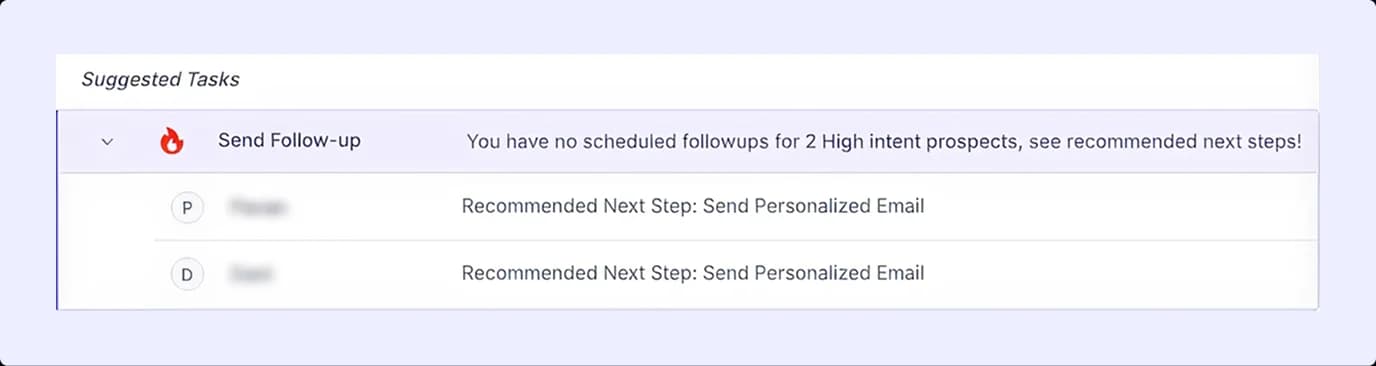
The High Intent Detector surfaced leads showing the highest engagement, ensuring outreach is directed to prospects most likely to convert.
Capabilities That Drove The Inbound Motion
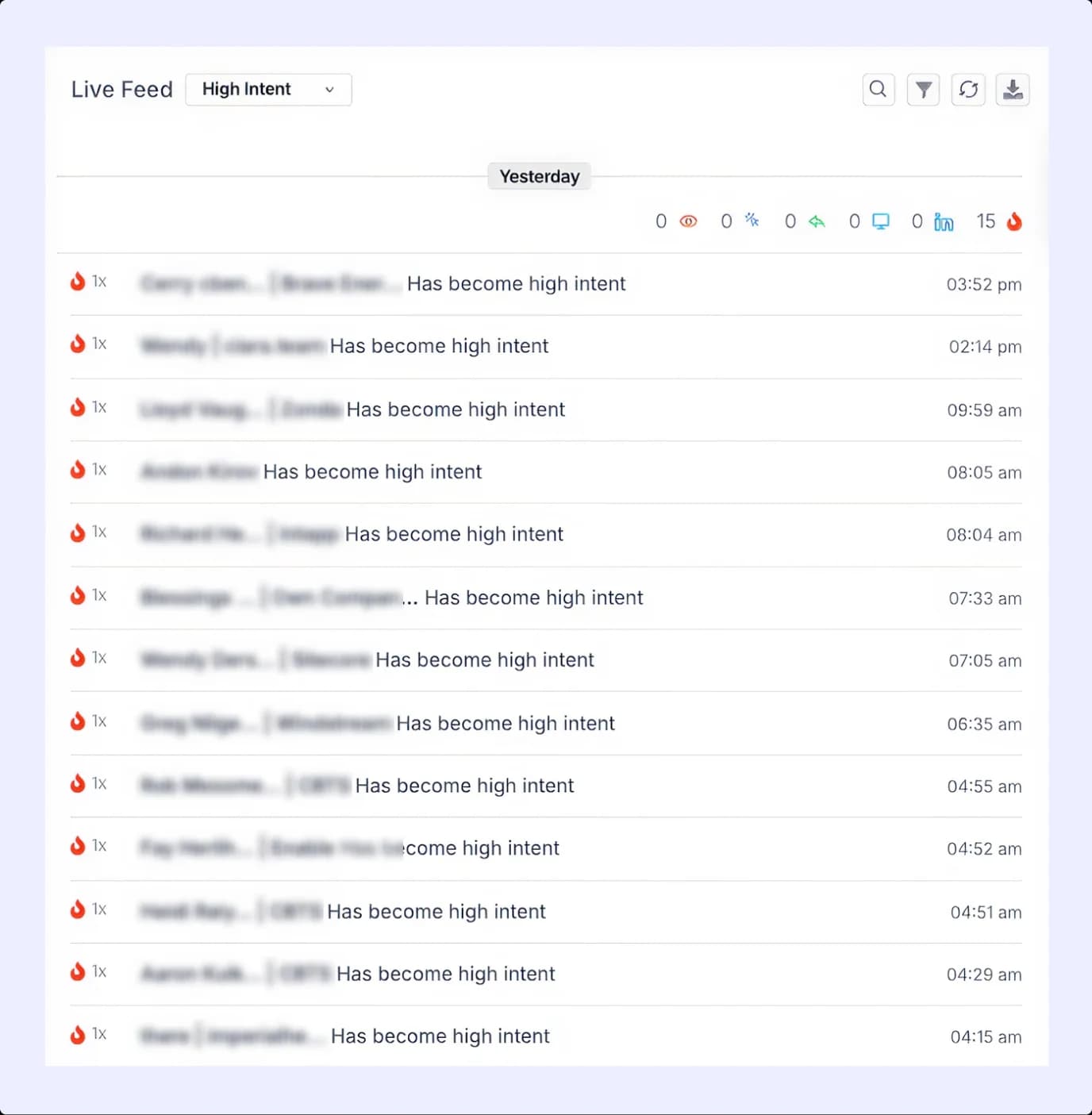
1. High Intent Detector
Flags prospects actively engaging with outreach, letting reps focus on the leads most likely to convert.
2. Number Rotation
Balances outbound call volume across multiple numbers, reducing the risk of spam flags and call fatigue. When paired with High Intent Detector and Multi-Channel Cadences, it ensures outreach is focused, efficient, and coordinated across channels.
"I have maintained different numbers with Klenty, and I'm able to switch between them easily. That feature works pretty well. And, pickup rates are solid.”

Closed-Lost Motion
The team needed a solution where past interactions could be quickly accessed, personalized follow-ups could be created, and high-priority leads could be targeted efficiently. This workflow would allow AEs to re-engage old opportunities effectively without starting from scratch.
How Klenty Supported This Workflow
Klenty allowed AEs to import all past conversation history from Zoho CRM, providing valuable context for each lead. Using this historical data, AEs could craft personalized touchpoints that resonate with previous interactions.
Capabilities That Drove The Closed-Lost Motion
1. Import Conversation History
With the Klenty + Zoho integration, any conversation recorded in Zoho CRM could be imported directly into Klenty.
This meant reps didn’t have to switch between tools to find past interactions or recall what was discussed earlier.
They could view the entire history of a prospect’s engagement: emails, calls, and notes in one place.
This helped them continue previous conversations without missing context or repeating questions. Reps could pick up exactly where the last interaction ended, making their follow-ups more relevant and natural.
2. Personalized Touchpoints
Using the Klenty + Zoho integration, reps could personalize their outreach based on the complete account history already stored in Zoho.
By syncing conversation data, Klenty enabled reps to craft targeted, contextual messages aligned with the prospect’s past interactions.
This eliminated the need to manually reference CRM notes before writing emails or making calls.
Every touchpoint, whether through email, call, or LinkedIn, could reflect the customer’s prior responses, needs, or pain points, leading to higher engagement and a better chance of reactivating lost opportunities.
"I'm running a cadence, and I just want context on what has been happening. We felt that the way Klenty collates all information for that particular client, making it easy to reference conversations even a year back, is very simple. In fact, I am able to generate 2-3 good opportunities every month using this."
Conclusion
How Synup used Klenty to help their sales team reach up to 140% of their monthly target.:
Simplify multi-step sales processes for both Account Executives and SDRs, reducing manual work and improving efficiency.
Engage 50–60 inbound leads per AE every month, ensuring timely follow-ups and higher opportunity creation.
Personalize outreach using past conversations, allowing AEs to re-engage lost opportunities effectively.
Focus on hot leads via calls and LinkedIn, prioritizing high-intent prospects for faster conversions.
"We were able to get the same value from Klenty that we previously got from SalesLoft, but at a much better price. Plus, all the integrations we needed were available in Klenty."