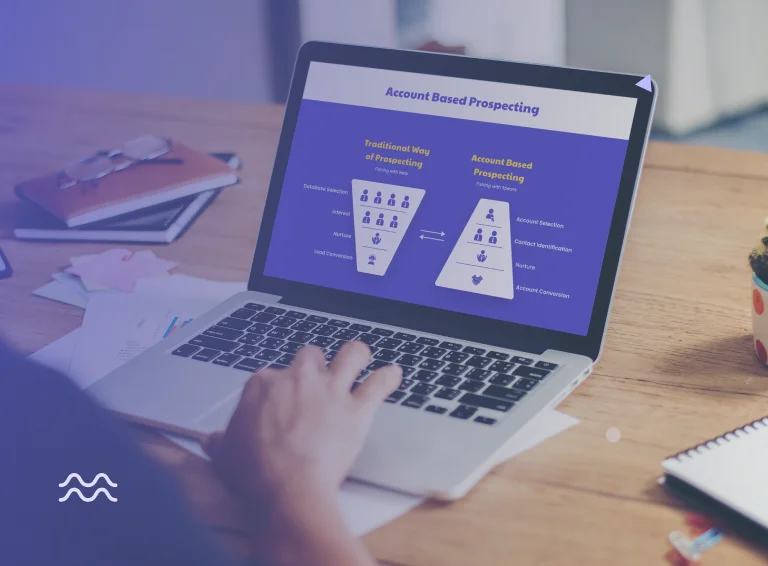
If you are selling into mid-market or enterprise accounts, you have probably noticed the moment the old playbook stops working.
You are no longer fishing in an ocean of prospects. You are working a defined list of target accounts. Burn through them with generic sequences and low-effort follow-ups, and you do not get a second chance.
The SDR team that figures this out first wins the account. The one still running volume plays loses it, and often permanently.
This is what an account-based selling template is designed to solve. It is a structured, repeatable operating model for how you build target lists, engage buying committees, run coordinated plays, and move accounts through stages systematically.
This blog walks you through that template, what it looks like in practice, how to execute each component, and how to run it without it collapsing into spray-and-pray with extra steps.
Why Generic Outbound Breaks Down in Account-Based Selling
The high-volume outbound playbook works in SMB because the assumptions behind it are true: your TAM is large, buying cycles are short, and one decision-maker can close the deal.
When you move upmarket, or shift to selling into specific verticals with a constrained addressable market, every one of those assumptions breaks.
Here is what changes:
Your TAM shrinks
Instead of tens of thousands of prospects, you are working 500 to 2,000 accounts. You cannot afford low connect rates or wasted touches. Every burned conversation costs you.
Buying committees expand
In mid-market and enterprise, you are navigating 11 or more stakeholders across different functions, each with different priorities and different objections. Reaching one person per account is the fastest way to lose a deal you never knew you were in.
Sales cycles get longer
Deals that used to close in 30 days now take 90, 120, or 180. Five-touch sequences were never built for this.
Pitching early kills momentum
Senior buyers in complex, enterprise sales do not want to be sold to in the first conversation. They want a point of view on their problem. Lead with a pitch, and you signal that you do not understand how they buy.
Connect rate becomes critical
When your TAM is finite, every conversation matters. You need systematic coverage, persistent follow-up, and multiple channels running together.
The account-based selling template addresses all of this. Let us walk through each component.
Also read: Top 20 Account-Based Selling Tools
The Account-Based Selling Template: 5 Core Components
Component 1: Target Account List and ICP Mapping
The template starts before a single email is sent. You need a defined list of accounts that match your ICP, and more importantly, accounts that are worth the sustained, coordinated effort ABS requires.
What this looks like in practice:
You are not building a prospect list. You are building an account universe, typically 500 to 2,000 accounts, depending on your segment, organized by:
- Firmographics: company size, revenue, headcount, geography
- Technographic fit: tools they use, systems you integrate with, or displace
- Buying signals: recent funding, hiring spikes, leadership changes, expansion announcements
- Proximity to existing wins: accounts similar to your best customers
The TAM constraint is real in any focused vertical or upmarket segment. With a finite number of accounts available in your target market, how you prioritize that list determines the quality of every downstream activity.
Remember that ach account on your list needs to be worth the investment of 10 to 20+ coordinated touchpoints across multiple stakeholders over multiple months. If it does not meet that bar, it does not belong on the list.
Component 2: Buying Committee Mapping
Once you have your account list, the next step is mapping who you need to engage inside each account before you send a single message.
In enterprise and mid-market deals, you are not selling to one person. You are selling to a buying committee. If you only have one contact engaged, you do not have an opportunity. You have a conversation.
The three tiers of a buying committee:
| Tier | Who They Are | What They Care About |
|---|---|---|
| Executive (C-suite, VP) | Strategic outcome owner | Business impact, risk, competitive position |
| Mid-level (Directors, Managers) | Process owner or functional lead | Efficiency, team productivity, workflow fit |
| End-user (Practitioners, Team Leads) | Person living the problem daily | Day-to-day friction, ease of use, adoption |
Identify 5 to 7 contacts per account, distributed across these three tiers. This is your starting coverage map. Not all of them will respond. But the goal in phase one is not conversion; it is coverage.
This is particularly important in complex B2B sales. Before you pitch a CTO, CIO, or COO on any strategic initiative, you need to understand how the problem actually manifests on the ground. Bottom-up research is not optional. It is what makes the executive conversation credible.
Component 3: The Three-Thread Engagement Strategy
This is the structural core of the account-based selling template. Every account you work should have three threads running in coordination.
Thread 1: Top-Down (Air Cover)
Target the executive who owns the outcome your product impacts. You are not trying to close them in an email. You are trying to get a mandate: "Yes, this is a priority. Talk to these people on my team."
Once an executive engages, every conversation below that level references their priorities. You are no longer cold.
When to lead with this:
- New logo accounts where you need executive sponsorship
- Competitive displacement requiring change management
- Strategic initiatives, not just tool replacements
Thread 2: Bottom-Up (Champions)
In parallel, engage the practitioners and team leads who live the problem daily. The goal is not budget approval. The goal is to build internal champions and gather the proof points you will need when you reach the executive and the budget holder.
When to lead with this:
- Land-and-expand or PLG accounts where users already exist
- Accounts where you need to understand actual workflows before going to leadership
- Situations where you need champions before you have air cover
Ask bottom-up contacts one question most SDRs skip: "If you were going to recommend a solution internally, what would you need to see to feel confident defending it?" That answer tells you exactly what wins the committee.
Thread 3: Direct (Budget Conversion)
Once you have air cover from leadership and real stories from the field, go to the economic buyer with a tight, ROI-led narrative:
"Your VP cares about X. Your team is struggling with Y. Here is the impact of doing nothing and a clear path to Z."
When to lead with this:
- After you have executive context and champion stories in place
- Competitive displacement with a time-bound decision
- Renewal situations where inaction has a cost
The play type decision table:
| Situation | Lead With | Support With | Close With |
|---|---|---|---|
| New logo, executive buy-in required | Top-Down | Bottom-Up proof points | Direct ROI and timeline |
| Land-and-expand, users already engaged | Bottom-Up | Top-Down ("your team is already seeing results") | Direct with budget holder |
| Competitive displacement or renewal | Direct (time-bound ROI) | Top-Down (strategic alignment) | Bottom-Up (user validation) |
You are assembling a coordinated narrative across a buying committee.
Component 4: Stage-Based Account Progression
In an account-based selling template, accounts do not move through a linear sequence. They move through stages, and each stage requires different, coordinated actions.
The four core stages:
| Stage | What It Means | Actions Required |
|---|---|---|
| Not Contacted | Account is in TAM, no outreach yet | Initial outreach to 5-7 contacts across all three threads |
| Contacted | Outreach sent, no response yet | Follow up with persistence; add new contacts based on research |
| Engaged | At least one stakeholder has responded | Multi-thread across the buying committee; share relevant content per thread |
| Responded | Multiple stakeholders engaged, momentum building | Schedule discovery calls; connect the threads; bring in AE if needed |
Each stage has a defined action window. Accounts in "Not Contacted" need initial coverage within 4 days. Accounts in "Engaged" need multi-threading activity within 5 days. Accounts in "Responded" need follow-up within 1 day.
Without stage-based tracking and action windows, accounts sit idle. High-intent accounts that should convert to pipeline quietly expire because no one knew they were stalling.
Component 5: Signal-Triggered Plays
The final component of the template is knowing which coordinated play to run based on what is actually happening in the account. A play is not a sequence you enroll someone into. It is a coordinated set of actions across the buying committee, triggered by a specific signal.
Here are the five plays from Jamie Shanks’ SPEAR Selling that move accounts:
Play 1: Sphere of Influence
Trigger: You have a mutual customer, a shared connection, or a strong reference in the account's network.
Core message: "You know [Customer X]. They work with us. Here is what changed for their team. You are one conversation away from the same outcome."
This play works because it skips the credibility-building phase. Trust is the hardest thing to build in a cold account. When you can bridge a connection, you start the conversation without the friction of being unknown.
What to prepare: the name of the shared customer, a specific outcome they achieved, and a clear bridge statement that connects them to the account you are working on.
Play 2: Stack-Ranking
Trigger: The account is underperforming versus industry peers, or you have benchmark data showing a gap between where they are and where best-in-class companies are.
Core message: "Here is where your team stands versus best-in-class in your space. Here is the gap. Here is what the companies closing that gap are doing differently."
This play works because you are not selling. You are showing them their position with external data. The goal is to push the buyer off their status quo by helping them recognize that others in the market are exceeding their benchmark.
Run this through the executive and direct threads. Benchmark data is a leadership-level wake-up call, not a practitioner conversation.
Play 3: Market Trends
Trigger: A macro shift relevant to the account's industry: new regulation, technology transition, market consolidation, or emerging competitive pressure.
Core message: "The market is moving in this direction over the next 3 years. Here is where companies ahead of this shift are already investing. Here is the risk of waiting."
This play works because most buyers are heads-down running their business. They are not tracking macro trends the way an informed vendor would. You become valuable the moment you show them something they could not easily find themselves.
Run this through the executive thread. This is a C-suite conversation about where the market is going, not a product pitch.
Play 4: Emerald City
Trigger: The account understands the problem but cannot yet see what "better" looks like concretely. They are skeptical of change because the outcome feels abstract.
Core message: "Here is what your team's day looks like after this. Here is a customer like you who made this change. Here is what they said six months in."
This play works because people change when they can see and almost taste the better outcome. Abstract ROI does not move practitioners. Concrete stories do.
Run this through the bottom-up thread. A "day in the life" walkthrough, a reference call with someone in the same role at a similar company, or a demo anchored to their actual workflow is infinitely more effective than a slide deck of features.
Play 5: Career Play
Trigger: You have identified a key stakeholder who is a potential champion but is not yet engaged, or who has gone quiet.
Core message: There is no pitch. The message is "I want to help you, not just your company."
This is the most underused play in the template, and the one with the highest long-term win rate. Broker an introduction to someone in your network who is relevant to their career. Share an industry report that makes them look smart in their next team meeting. Invite them to an event they would not otherwise access.
Run this through the bottom-up thread. A practitioner, manager, or team lead who becomes a genuine advocate inside the account because you helped their career is worth more than ten cold executive conversations.
What Thread-Specific Outreach Looks Like
Most ABS resources give you generic templates. Here is what works when you are running the three-thread strategy:
Top-Down Email (Executive Level)
Hi [Name],
I have been researching how [industry] companies are approaching [strategic change], and I noticed [specific observation: recent funding, expansion, leadership hire].
One pattern we are seeing at companies at your stage is:
[strategic challenge or risk]
We have worked with companies like
[Reference Customer]
to achieve:
[strategic outcome]
Would it be worth a brief conversation?
Best,
[Your Name]
Bottom-Up Email (Practitioner Level)
Hi [Name],
Quick question: [specific pain point tied to their day-to-day work]?
I ask because we work with a lot of [their role] at [industry] companies, and the number one complaint we hear is [common frustration].
[Reference Customer]'s team went from [before state] to [after state] in the first month.
I put together a short demo that shows exactly how. Want me to send it over?
Best,
[Your Name]
Direct Email (Budget Holder)
Hi [Name],
I have been speaking with a few people on your team about [specific problem]. A consistent theme keeps coming up: [pain point from bottom-up conversations].
[Reference Customer], a [similar company], was facing the same situation. Within 90 days, they saw [Metric 1], [Metric 2], and [Metric 3].
Do you have 15 minutes this Thursday or Friday?
Best,
[Your Name]
The principle across all three references the account, not just the persona. Lead with a point of view, not a pitch. Connect to the thread you are working on.
How Klenty Runs the Account-Based Selling Template
An account-based selling template only works if it is actually executed. The gap between the template on paper and what happens in the field is where most ABS programs die.
Most sales engagement platforms were built for prospect-based, high-volume outbound. They optimize for speed and scale. Account-based selling requires depth and coordination. That is a different architecture entirely.
Here is how Klenty enables account-based execution:
Build Your Target Account Universe
ICP Account Mapping and List-Building
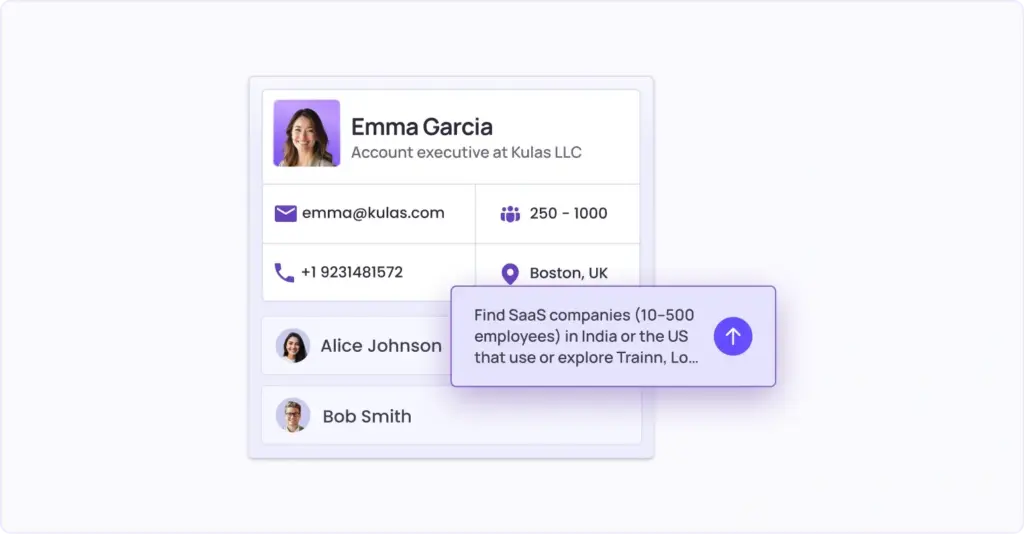
Describe your ICP in natural language and build your target account list in seconds. AI-powered account discovery eliminates manual research and ensures you are targeting the right accounts from day one, so your reps spend time on accounts that actually convert, not on building spreadsheets.
AI Dialer
Klenty's Connect AI is a proprietary dialing infrastructure purpose-built to solve the structural reasons why calls go unanswered. Connect AI addresses every reason: numbers flagged as spam from overuse, calls going out at the wrong time, numbers shared across the team, short call durations signaling spam behavior to carriers, and no segmentation by phone intent.
Before dialing even begins, Connect AI optimizes five critical layers:
- Number Inventory: AI assigns unique numbers for each rep with dedicated pools organized by geography and territory, reducing overuse and spam flag risk.
- Call Timing Selection: AI chooses the perfect time to place each dial based on past call connects, email open times, and prospect timezone, ensuring calls hit during prospect active hours.
- Phone Intent: AI surfaces prospects likely to answer the phone by tracking missed incoming calls, multi-channel engagement signals, and recent outbound interaction. Reps start with contacts most likely to answer, not dialing blindly.
- Number Auto-Rotation: During dialing, Connect AI intelligently rotates numbers based on call-from number health and historical pick-up behavior, protecting number reputation while increasing pickup probability on follow-up attempts.
- Local Dialing: AI matches the right local area code to your prospect's region. When prospects see a familiar local number instead of an unfamiliar caller ID, pickup probability increases significantly.
After each dialing session, Connect AI continues optimizing. Number Health Reporting tracks pick-up rate, hang-up rate, voicemail rate, and average call duration. Underperforming numbers are automatically pulled from rotation and replaced with fresh ones. Reps can drop one-click personalized voicemails to extend call duration, improve callback rates, and maintain dialing speed.
Multichannel Outreach
Multi-channel outreach is critical for reaching buying committees, but personalization at scale is impossible without the right tools. Klenty enables you to execute coordinated outreach across email, calls, SMS, and other platforms while maintaining hyper-personalization at the account level.
Merge Fields and Liquid Templates let you add custom phrases and dynamic content based on prospect type and behavior. Kai, Klenty's AI Cadence Writer, scans the prospect's website to pick out personalization points and insert hyper-personalized openers, problem statements, and CTAs.
With auto-rotation of inboxes, email warmup, and AI-researched personalization, your emails land in primary inboxes and win more replies. Klenty's Multi-Channel Inbox collates all prospect communication in one place, allowing you to manage interactions without switching tabs.
This means every stakeholder in the buying committee receives relevant, personalized outreach across their preferred channels, without adding manual work to your SDRs. You control timing and messaging at the account level, ensuring coordinated touches across all threads, not disconnected individual outreach.
Execute and Coach in Real-Time
AI Coaching Suite
Klenty's Call Coaching Suite directly addresses the two problems that hold most outbound teams back: managers who cannot see what is happening on live calls, and reps who have no clear picture of where their conversations are breaking down.
AI Call Scorecard
Every call is automatically scored across key sections: opener, discovery, objection handling, and closing. Managers get a full picture of rep performance without having to listen to every recording. Reps get clear, specific feedback on what went well and where to improve. Custom scorecards can be built for different products or verticals, making scoring relevant regardless of what the team is selling.
Live Call Studio
Managers and reps can see who is on a call in real time and click to listen in from a centralized view. Junior reps can listen to veteran reps' live calls to learn how top performers handle objections and move prospects forward, without waiting for a weekly debrief. Managers can leave notes immediately after a call while the context is still fresh.
Battlecards
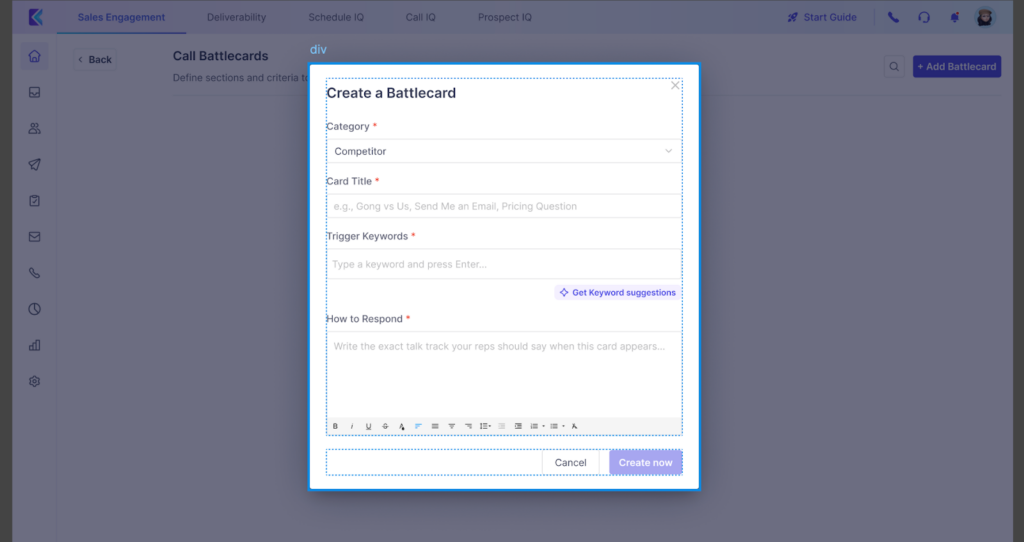
Battlecards give reps real-time, on-call guidance the moment a critical keyword or topic is detected in the conversation. When a prospect brings up pricing, a specific competitor, or a common objection, a tailored card instantly pops up with the right talk track, proof points, and questions to ask, so reps never have to scramble for answers or put prospects on hold.
This helps new reps ramp faster, keeps messaging consistent across the team, and ensures your best objection-handling tactics are used on every call, not just by your top performers.
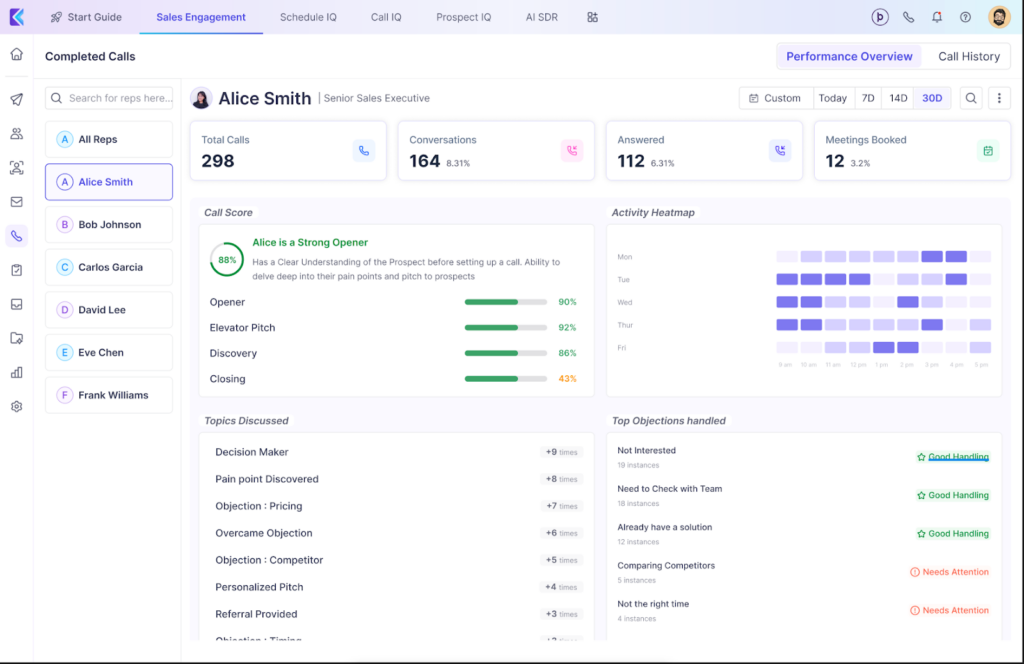
Call Performance Overview
The Call Performance Overview turns every conversation into a coaching asset by breaking down how well a rep handled key parts of the call - from opener to discovery questions to objections and closing.
After each call (or over a time period), managers and reps can see which moments were executed well, where conversations typically stall, and which topics or keywords come up most often, visualized as easy-to-scan charts. This makes it simple to identify top-performing talk tracks, spot skill gaps at an individual or team level, and prioritize coaching around the objections and themes that actually dominate real calls.
Orchestrate Coordinated Engagement Across Buying Committees
Account Action Window
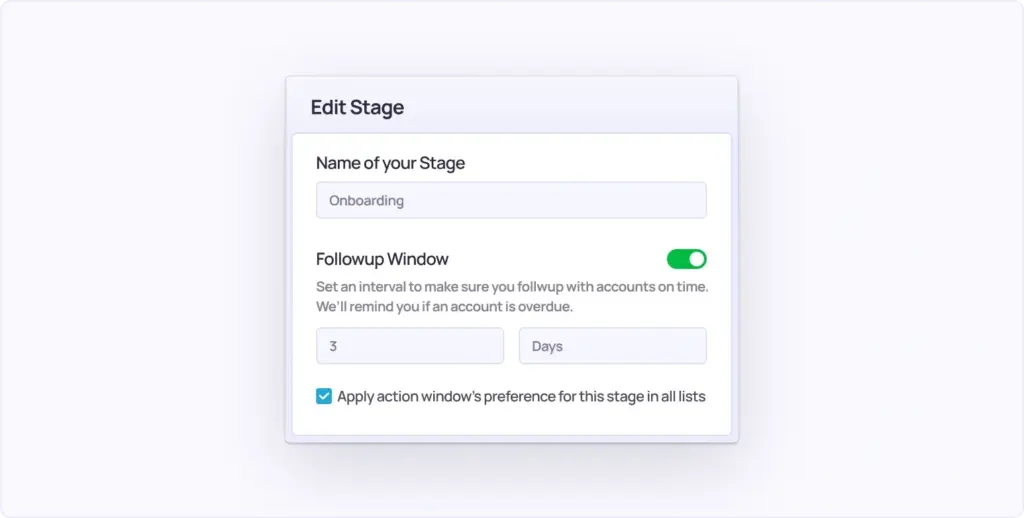
Every target account is at a different stage in its buying journey. Some need urgent action and immediate follow-up to turn into an opportunity - they are in-market. Others need more time, a longer nurture cycle before they are ready to talk to sales.
The problem is that all account actions pile up on your dashboard, leaving no room for prioritization. With traditional sales engagement tools, there's never been a way to control the velocity of rep execution against a set of accounts.
Account Action Windows changes that.
Choose the time period within which actions need to be taken for accounts in each stage. Klenty alerts you when they are overdue. The deeper an account is in its buying journey, the faster reps execute - systematically progressing cold accounts toward an opportunity by following up at set intervals.
Here is what you can do with Account Action Windows:
- Set the frequency, messaging, and channels for every prospect in an account to be engaged.
- Control the velocity of rep execution based on where each account sits in the buying journey.
- Ensure coordinated outreach across the entire buying committee so emails, calls, and LinkedIn touches hit the right people at the right time, not in random bursts.
- Get alerted when action windows are overdue so no account slips through the cracks.
Outreach Methodology (Multi-Threading)
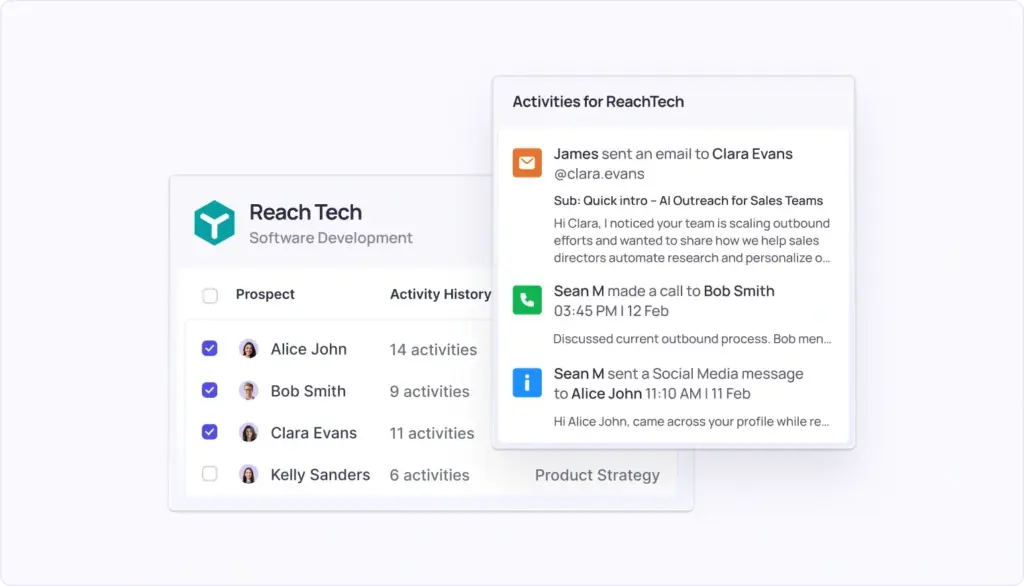
Enforce adherence to top-down, bottom-up, or custom multi-threading workflows. Systematically engage executives, mobilizers, and users within each account based on your preferred approach, ensuring no key stakeholder is left untouched, and every account gets full buying committee coverage.
AI Next Step Execution
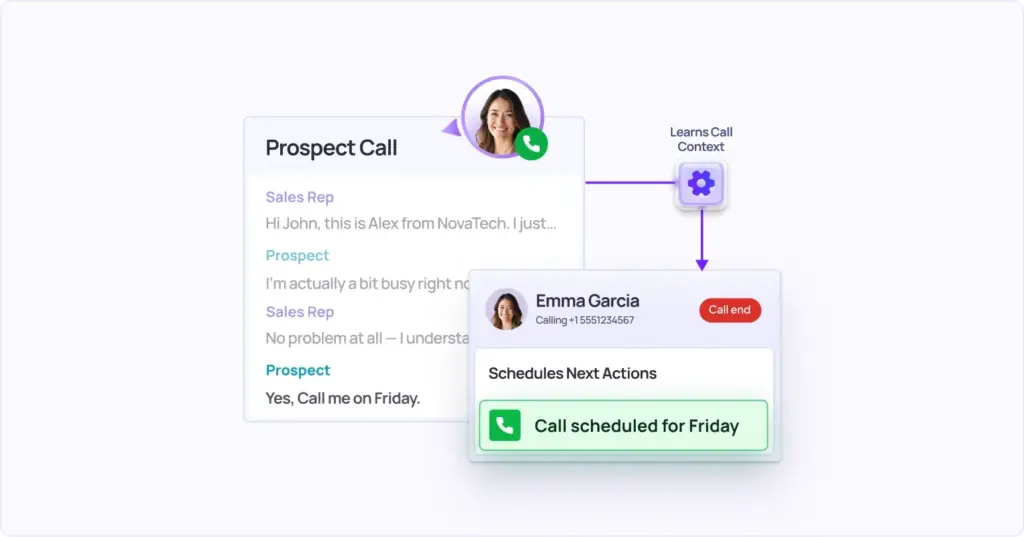
Klenty’s Action AI listens to your sales conversations, understands what was discussed on the call, and intelligently generates the next action. You can focus on dialing, not managing next steps, execute the right tasks at the right time, and save time with auto-generated follow-up messaging.
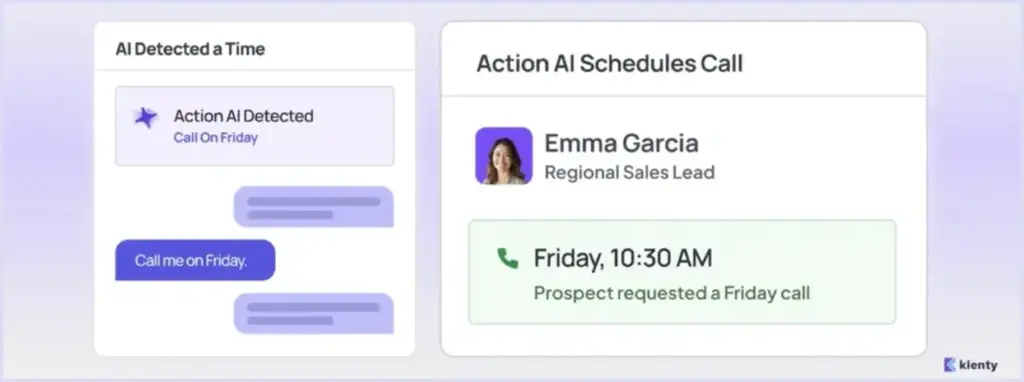
Time-Based Next Actions
Prospect says, “Call me on Friday.” → Action AI schedules a call for Friday with the prospect.
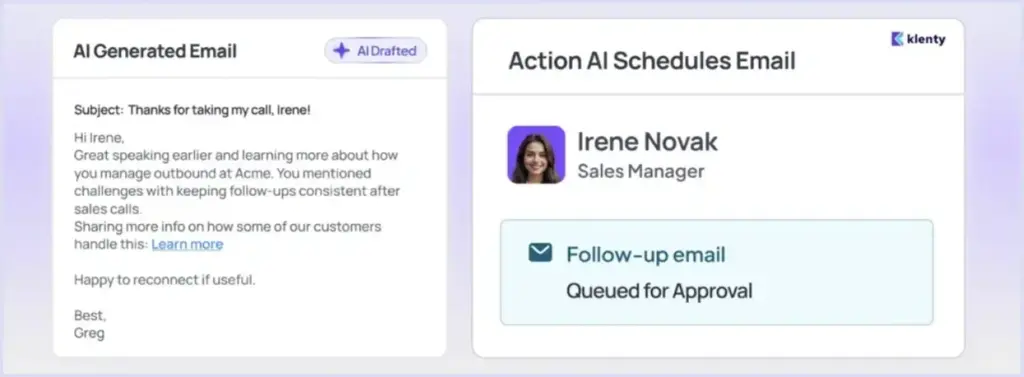
Channel-Based Next Actions
Prospect says, “Send me an email.” → Action AI creates a personalized email and queues it up for approval.
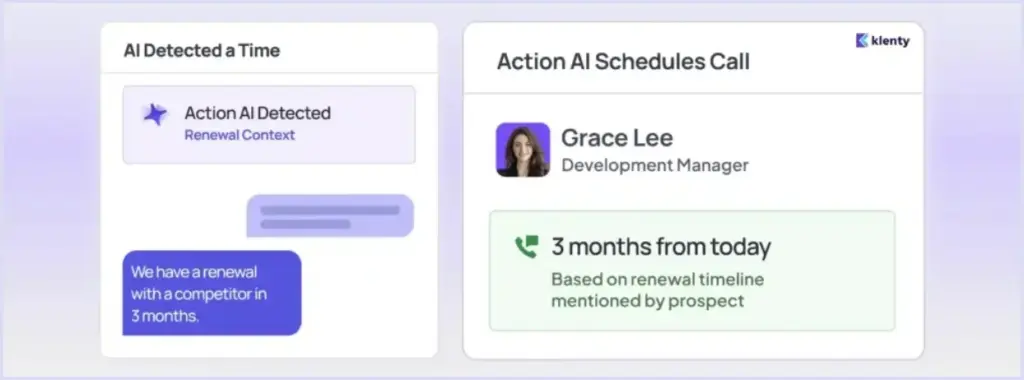
Context-Based Next Actions
Prospect says, “We have a renewal with a competitor in 3 months.” → Action AI schedules a call in 3 months with a call context.
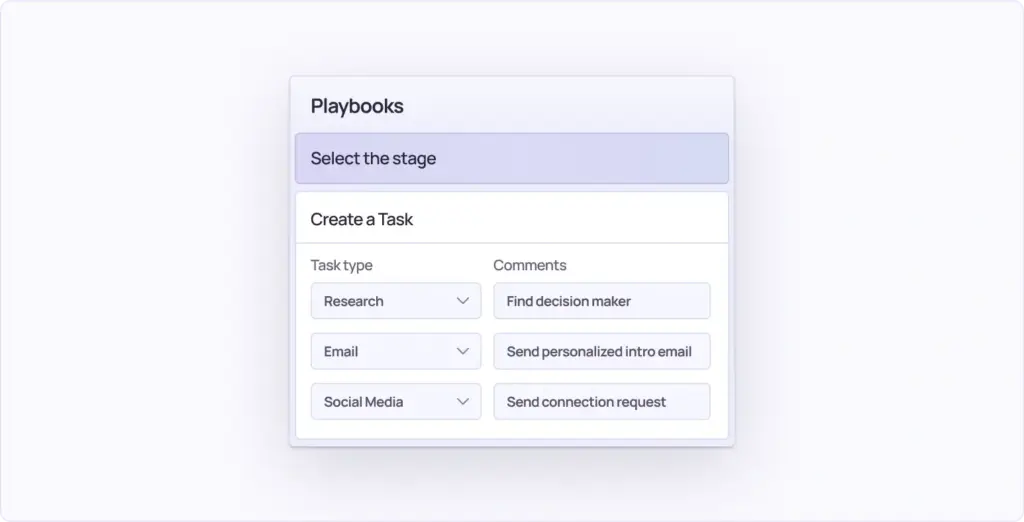
Account Playbooks
Not all accounts are alike. Only 3% of your cold accounts are in-market at any given time; the rest need outreach that adapts to their needs, timing, and fit.
Traditional sales outreach tools are built purely for demand capture, leaving the other 97% of accounts without a structured way to be nurtured toward a buying decision.
Account Playbooks are built for both - helping you capture demand and create it.
Trigger the Right Play at the Right Stage
Set entry and exit criteria for each account stage and define the activities that need to happen as soon as accounts meet the criteria - across emails, calls, and tasks. When accounts show specific signals or reach certain stages, the right plays trigger automatically, so your team responds to buying intent in real time instead of discovering it weeks later in a pipeline review.
Control Velocity and Urgency of Execution
Not all stages carry the same urgency. Set Account Action Windows for each stage to control how fast reps execute. For instance, accounts in a "Decision-Maker Contacted" or "Meeting Booked" stage can be set to require execution instantly or within 24 hours, while earlier-stage accounts follow a longer, more measured cadence.
Orchestrate Playbooks Account-by-Account
Label accounts as "interested," "right contact identified," or "good fit, not now," and execute the right sequence of activities for an entire account before moving on to the next. This ensures outreach is coordinated across the entire buying committee - enrolling every prospect in customized follow-ups based on org-wide engagement level, so no account context is lost mid-play.
Account Panel
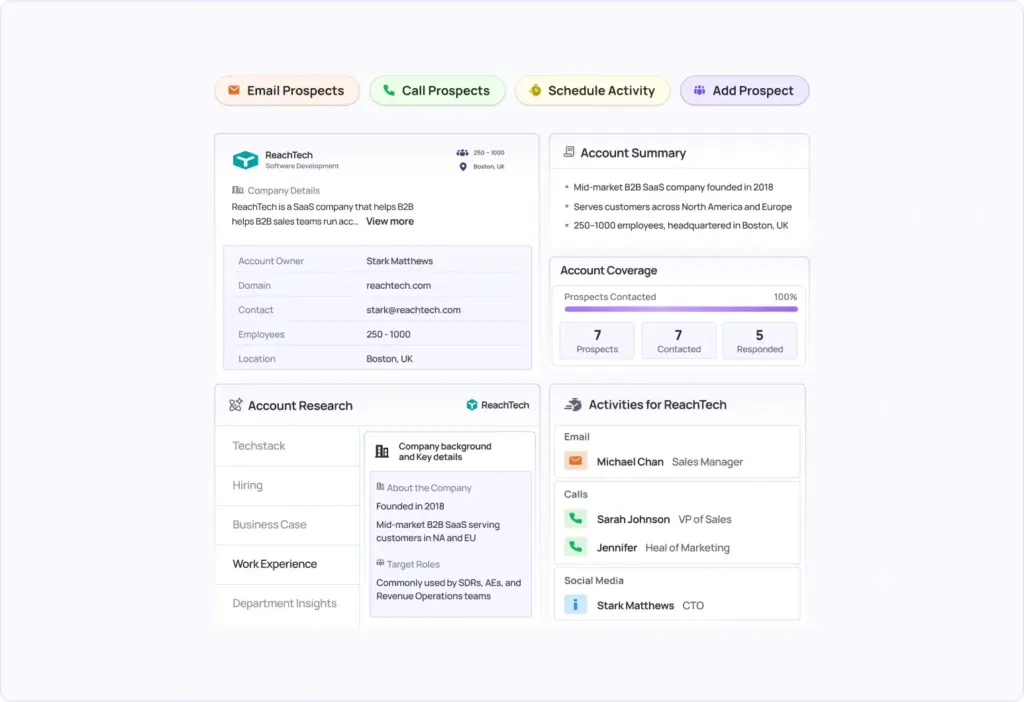
Klenty’s Account Panel helps you to -
Execute Outreach Account-by-Account
Unlike traditional sales engagement tools that are built around individual prospects, the Account Panel lets you group prospects by account and execute emails, calls, and tasks at the account level. Reps can move through research, sending emails, making calls, and finding fresh prospects - all without jumping between tools or losing context mid-execution.
Review the Entire Account's Engagement History
Rather than patching together individual prospect interactions in a spreadsheet, get a consolidated picture of every interaction across all stakeholders in an account, out of the box. Reps walk into every call informed, and managers see the full picture without chasing updates.
Multi-Thread Across the Buying Committee
Know exactly which prospects exist in an account, track coverage across hierarchies, roles, and titles, and add fresh prospects to ensure all relevant stakeholders are being engaged. No contact goes untracked, and no decision-maker falls through the cracks.
Run a Well-Researched, Consultative Sales Process
Basic account details, past conversation summaries, and AI-powered account research insights surface at the moment of dial, so every outreach stays relevant, timely, and specific to the account your rep is working on.
Track Account Progression and Optimize Coverage
Account Stages
Traditional sales outreach tools leave you with an Account Development Gap - you do not know which accounts are moving toward an opportunity and which are stuck, you can't define tailored strategies for each stage, and there's no systematic way to nurture demand across accounts that aren't ready yet.
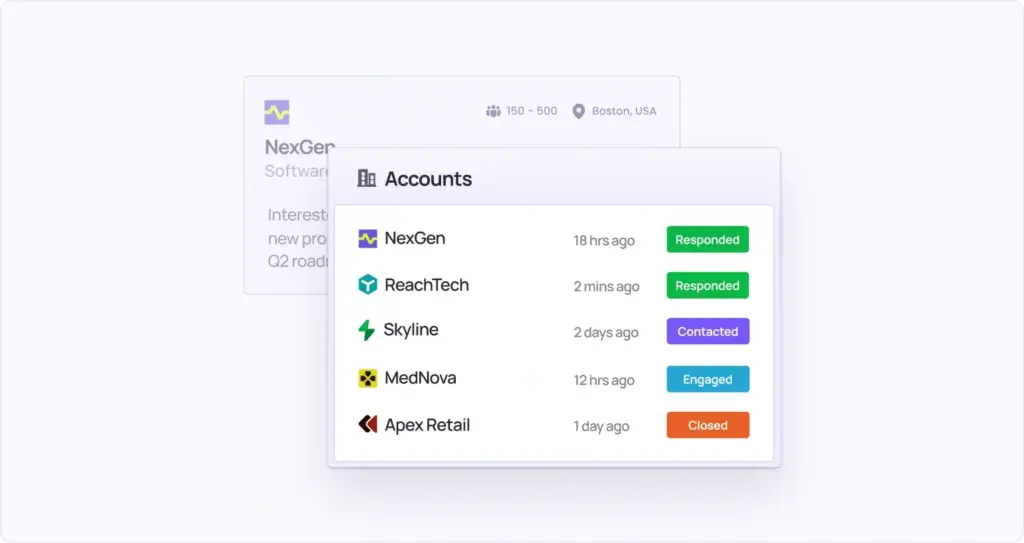
Klenty's Account Stages fixes this with CRM-like stages built specifically for sales outreach.
Define a Custom Pipeline for Account-Based Outreach
Create a custom pipeline for each account list and set up stages that reflect the actual steps accounts go through before turning into an opportunity. Every account has a defined place in the journey; nothing falls into a grey area.
View and Drill Into Accounts at Every Stage
With one click, dig into all accounts sitting at any stage of your pipeline. Drill deeper into account-level details like prospects contacted, notes, next steps, and activity history, all consolidated in a single table view so nothing needs to be chased down manually.
Set Custom Strategies for Each Stage
Define entry and exit criteria for each account stage and prescribe the series of actions that need to happen as soon as an account moves in. Each stage gets its own tailored outreach strategy, so reps always know exactly what to do next, for every account, at every step.
Prescribe the Urgency of Execution at Each Stage
Prevent account rotting. Set deadlines for actions to occur at each stage of the pipeline so accounts at advanced stages get immediate attention, and no high-intent account sits idle waiting for a rep to take action.
Account Coverage Analysis
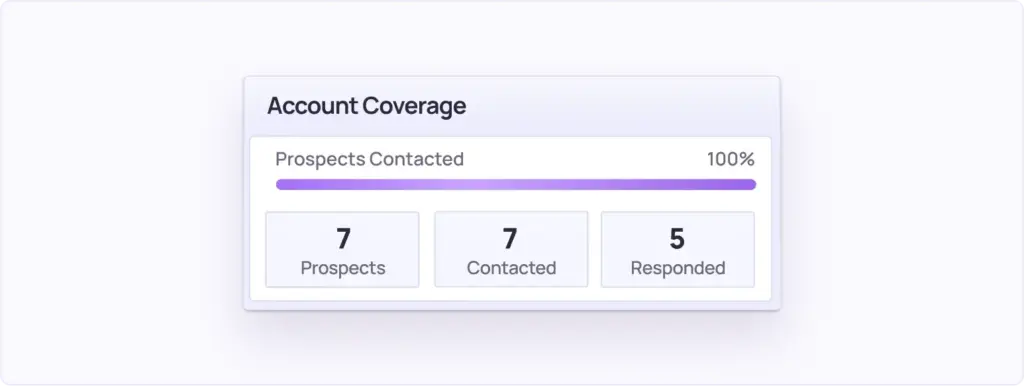
Review the percentage of ICP prospects engaged in any given account and identify gaps for deeper multi-threading. This ensures you are not leaving key stakeholders untouched, the single biggest reason ABS deals stall or die in the pipeline.
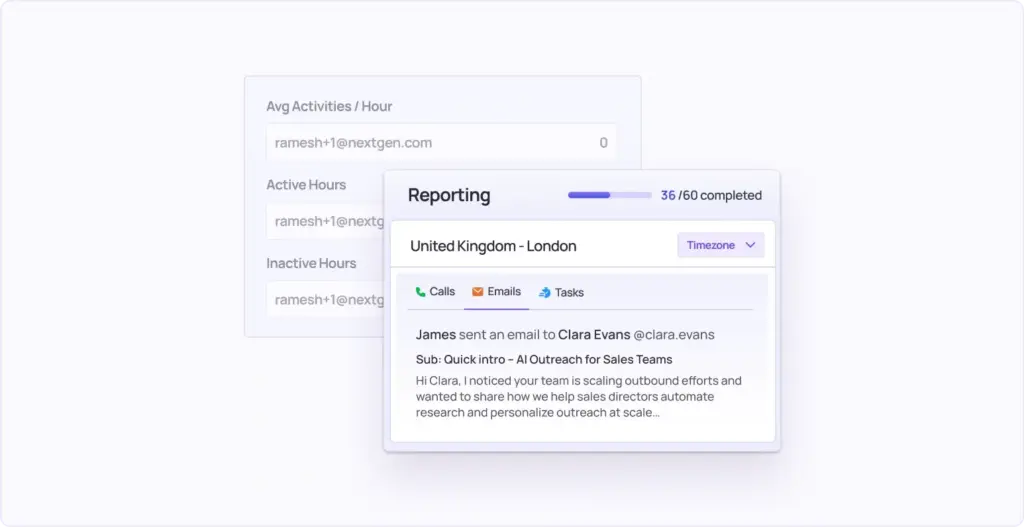
Account-Level Reporting
Track SDR activity across daily, weekly, and monthly timelines and contrast it against target account progression. You measure what actually matters, account movement and pipeline created, not just email volume or call counts that look busy but produce nothing.
Conclusion
The account-based selling template is a different operating model: account-centric list building, coordinated three-thread engagement, signal-triggered plays, stage-based progression, and coverage tracking that tells you whether the right people in each buying committee actually know who you are.
Most sales engagement platforms were not built for this. They were built for high-volume outbound, where speed and scale are the levers. Account-based selling requires depth and coordination, and that requires different infrastructure.
With Klenty, your SDRs know which accounts to prioritize and why. They walk into every call with the full history of every conversation in that account. They follow a defined multi-threading methodology because the platform enforces it. Follow-ups happen automatically. Coverage gaps surface before deals stall. And the only metrics on the dashboard are the ones that actually predict pipeline.
If your team is ready to move from spray-and-pray outbound to a structured account-based selling template that systematically develops target accounts into qualified pipeline, Klenty gives you the infrastructure to run it.
Book a demo to see how enterprise B2B teams are using Klenty to convert target accounts into pipeline.
- The template shifts the unit of work from the prospect to the account. Everything from list building to outreach to reporting has to reflect this. You cannot run an account-based selling template with prospect-based tools and a prospect-based mindset.
- All three threads need to run in coordination. Top-down gets you air cover. Bottom-up gets you champions. Direct closes the loop. Running only one or two is the primary reason deals stall in committee.
- Plays need triggers. Each play should be activated by a specific signal: funding, a competitive move, a hiring spike, or a stakeholder going quiet. Signal-first is what separates a play from a sequence.
- Stage-based progression beats linear cadences. Accounts do not move through your sequence on your timeline. They move based on buying readiness. Your job is to have the right actions ready at every stage and to never let an account sit idle.
- Coverage predicts deal success better than activity. Calls made and emails sent tell you how busy your team is. Account coverage tells you whether the right people in the buying committee know you exist.
- Without an enforced methodology, plays become suggestions. Ten SDRs running their own version of a play means ten different messages and no way to diagnose what is working. Centralized plays with platform-level enforcement are what make ABS repeatable.
FAQs: Account-Based Selling Template
1. What is an account-based selling template?
2. How is an account-based selling template different from a sales sequence?
3. Who should use an account-based selling template?
4. What are the core components of an account-based selling template?
5. How many stakeholders should you engage per account?
6. What tools do you need to run an account-based selling template?
7. How do you measure success with an account-based selling template?
8. What is multi-threading in account-based selling?
9. Can small sales teams use an account-based selling template?
10. How long does it take to see results from an account-based selling template?
About the Author