If you’re exploring sales engagement platforms for your team, Apollo.io has probably made your shortlist.
But is Apollo.io’s pricing model truly suited to the needs and budgets of modern B2B sales teams?
Before you dive in, it’s important to know some of the key issues that you could face when relying on Apollo as your sales engagement platform:
- Chasing the wrong accounts (filter-based solutions, and the AI Assistant does not map your ICP from the get-go)
- Standardized cadences (which lead to the same cadence being executed for every account)
- Burden of execution on your reps (a lot of overdue tasks)
- Lack of support for scaling the channels that work (no built-in deliverability infrastructure, limited dialing capabilities)
In this blog, you’ll see a clear breakdown of Apollo.io’s pricing plans, the features included at every tier, what each plan covers, and what it leaves out. You’ll also find out which teams each plan is best for, and what questions to ask before committing.
By the end, you’ll have everything you need to decide if Apollo.io’s pricing is the right fit for your sales process, or if another solution could deliver more value for your team.
Let’s dive in.
What Is Apollo.io?
Apollo.io is a cloud-based sales automation platform focused on lead generation, contact database management, and email outreach. Founded in 2015, it serves as a lead intelligence and sales engagement platform trusted by nearly 9,000 customers, including major global enterprises. Apollo.io provides tools to identify prospects, automate outreach sequences, and manage contacts effectively to help sales teams build a pipeline and close deals.
What Does Apollo Offer For the Price?
Free Plan
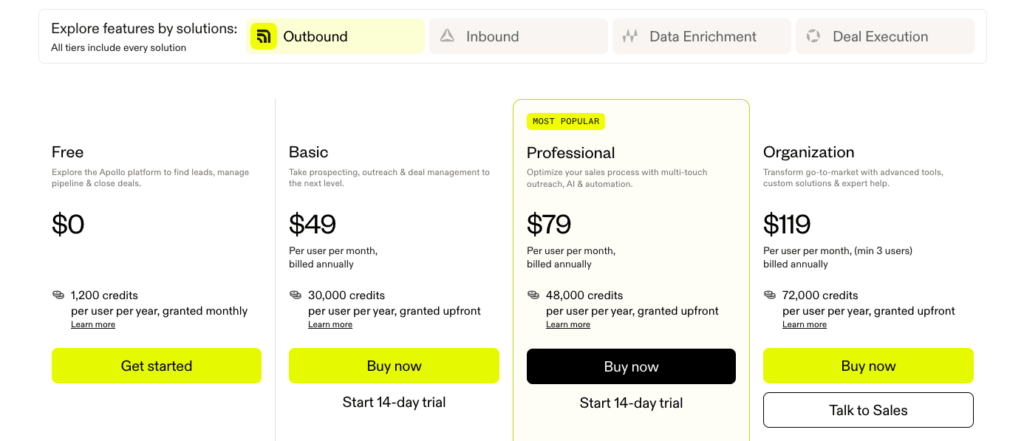
The Free plan lets you use Apollo.io at no cost. You get 1,200 credits per user per year (granted monthly), basic filters, AI Assistant (beta), AI Research, two sequences, and Gmail integration for sending email campaigns.
You can also access core deliverability tools and the Chrome extension for prospecting. This plan is ideal for individuals or small teams starting out, with access to essential sales conversation tools and limited database querying.
Basic Plan
The Basic plan is priced at $49 per user per month if billed annually ($59 monthly). It provides 30,000 credits per user per year, advanced filters, unlimited sequences, AI Lead Scoring, integration with major email providers, waterfall enrichment, meeting/intent filters, domain/mailbox purchasing, CSV/CRM/API data enrichment, and CRM integration (Salesforce, HubSpot).
Export credits and mobile credits are increased, and reporting features are expanded as well. This plan is designed for teams who need more outreach volume and flexibility than the Free tier, but still have basic prospecting workflows.
Professional Plan
The Professional plan costs $79 per user per month if billed annually ($99 monthly). It upgrades you to 48,000 credits per user per year, unlocks US dialer functionality, call recording, AI insights, automated workflows, unlimited Gmail/Microsoft mailboxes, advanced reporting, and A/B testing for email sequences.
Teams at this level get dialer access, deeper automation, and expanded analytics, suited for mid-sized sales teams focused on scaling up outreach, performance tracking, and campaign optimization.
Organization Plan
The Organization plan starts at $119 per user per month (minimum 3 users, billed annually; $149 monthly). You get 72,000 credits per user per year and access to international dialing, 12 intent topics, customizable dashboards, advanced security (SSO), deeper integrations, custom LLM API key support, and enterprise-grade admin controls and support. This plan is built for large teams needing governance, volume, and custom workflows for complex operations, with priority support and enhanced management features.
Is Apollo Worth the Investment for Your Sales Process?
Pros and Cons of Apollo
Pros of Apollo.io
- Large B2B Database: Apollo.io provides access to a database of over 275 million contacts and 73 million companies, enabling highly targeted prospecting with advanced filters.
- Pricing: Apollo.io offers a free-forever plan and affordable paid tiers, giving startups and growing teams access to robust sales tools without a high upfront cost.
- Flexible Email Sending: You can send high volumes of emails per day by connecting multiple mailboxes, with raised thresholds on paid plans. (Note: There are still best-practice and deliverability-related caps to observe, but Apollo is more flexible than many competitors).
Cons of Apollo.io
- Standardized cadence for each account: Apollo.io’s Sequence tool enables building automated workflows, but users are limited to pre-existing automation templates. This means that every account can end up following the same cadence; customization is reduced because you cannot create fully custom triggers or advanced branching, which diminishes the ability to adapt to each prospect’s context.
- Built for demand capture, not demand creation: Apollo.io excels primarily in finding and capturing “in-market” leads, leveraging its extensive contact database and campaign automation features. Its design is optimized for targeting active buyers, using filters, prospect research, email deliverability, and tracking, but lacks top-of-funnel demand creation features or broader multi-channel orchestration for generating new demand.
- Reps need to execute tasks manually: Tasks in Apollo.io require reps to create, review, and complete steps manually, including calls, LinkedIn actions, and manual follow-ups within sequences. Sequence steps or tasks can be automated to a degree, but still require significant rep involvement for execution, resulting in more process work and overdue tasks piling up for users who manage large books of activity.
- No way to scale email without compromising deliverability: Apollo.io provides recommendations and guardrails for daily sending limits (suggesting no more than 50 emails per day per mailbox) because sending too quickly or in high volumes can cause inbox placement to drop due to spam filters and rate limiting.
Deliverability is reliant on manually configuring and monitoring SPF, DKIM, DMARC, and inbox warmup; going beyond recommendations introduces risk to sender reputation and reduces the ability to safely scale outreach volume.
Apollo’s workflow and technical gaps build up non-pipeline activity for your team, while Klenty’s platform and the 2025 AI Outbound Playbook move you from task overload to pipeline focus, letting AI agents handle the tedious steps so you can prioritize what grows revenue.
Apollo.io's G2 Reviews
A sales engagement platform is a significant investment for your organization, and a wrong decision can prove to be costly.
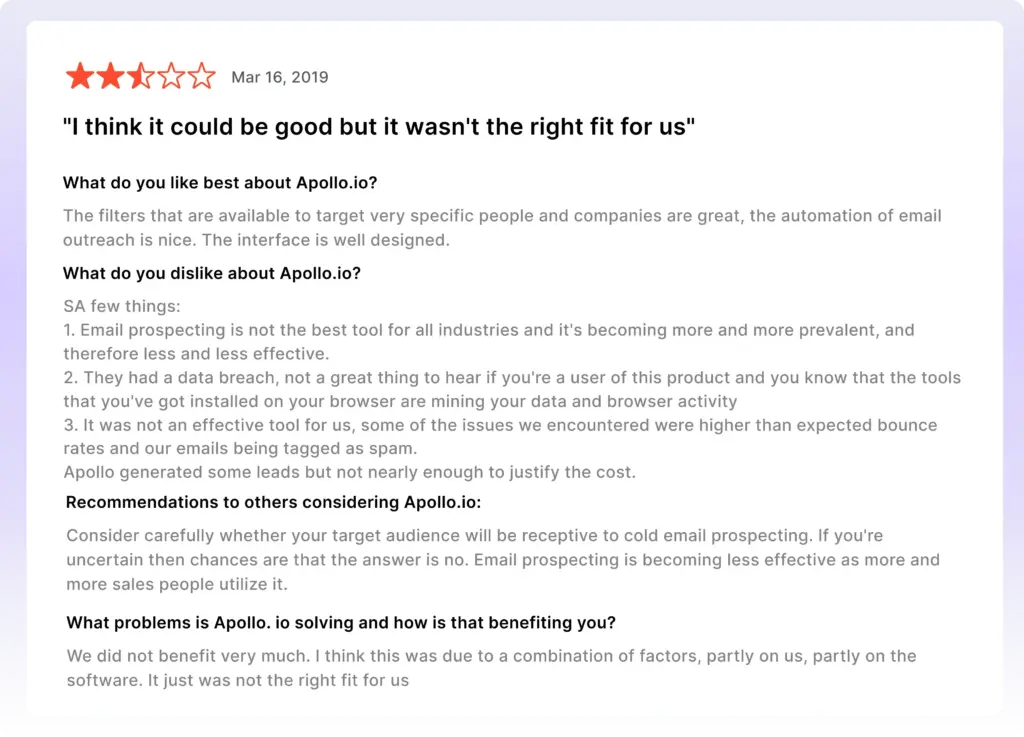
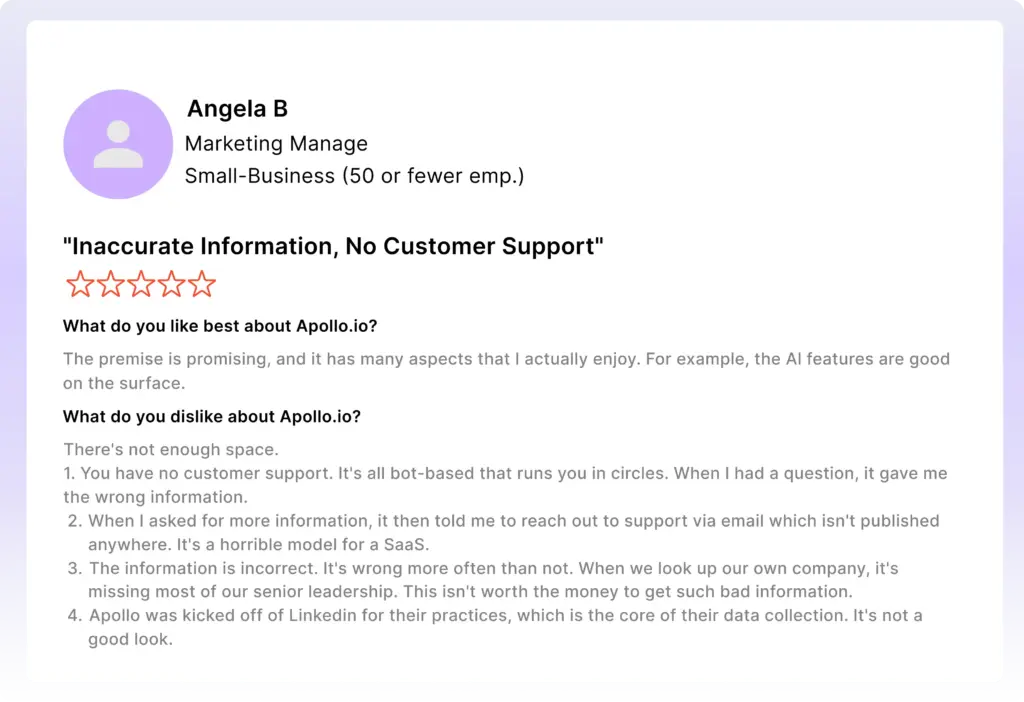
So, checking reviews on G2 from users who have used the solution you’re evaluating will give you valuable insights about its pros and cons, helping you make a well-informed decision.
Why Klenty Is a Better Alternative
With Klenty, you avoid chasing the wrong accounts. AI-powered engagement actively scores and vets your lists, so every rep works only on high-fit, high-priority prospects. Instead of being stuck with standardized, generic cadences for every account, your team gets a tailored mix of sequences and messaging based on prospect intent and real engagement.
Klenty doesn’t pile you up with admin work. Reps act as approvers rather than task-doers, which means less time on overdue follow-ups and more time moving opportunities forward.
With built-in deliverability infrastructure and advanced parallel dialing capabilities, you scale outreach across winning channels and maximize the time your team spends on pipeline-building activity.
Let's delve into why Klenty might be a more appealing choice for your growing sales team.
Features of Klenty
1. Agentic Cadences
Agentic Cadences help sales teams create a unique strategy of engagement for each account- and then execute that strategy with AI.
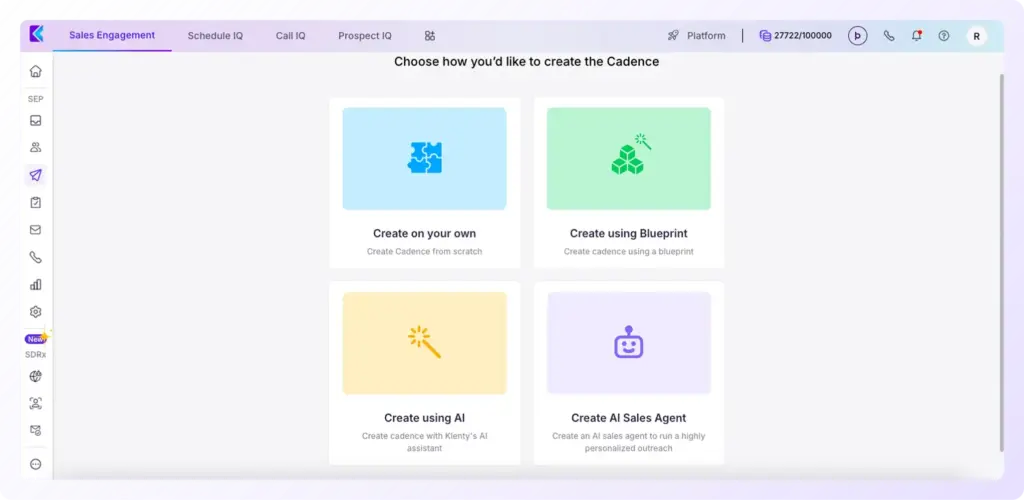
Agentic Cadences let you use AI in 3 specific ways
- Create entire personalized cadences with AI
- Ask AI to create specific email steps in the cadence- be it personalized emails or research actions.
- insert account and prospect research into your existing templates with ‘AI Variables’
Agentic Cadences allow reps to go from manually drafting every sequence and every email to just ‘reviewing and approving’ AI output.
You get complete control over AI generation- set guardrails at the global-level (across your team), sequence-level, or at the email-level.
2. Demand Nurture and Demand Capture with AI Playbooks
Static sequences assume all prospects behave the same way. Klenty’s AI Playbooks change that by allowing cadences to respond dynamically to prospect behavior.
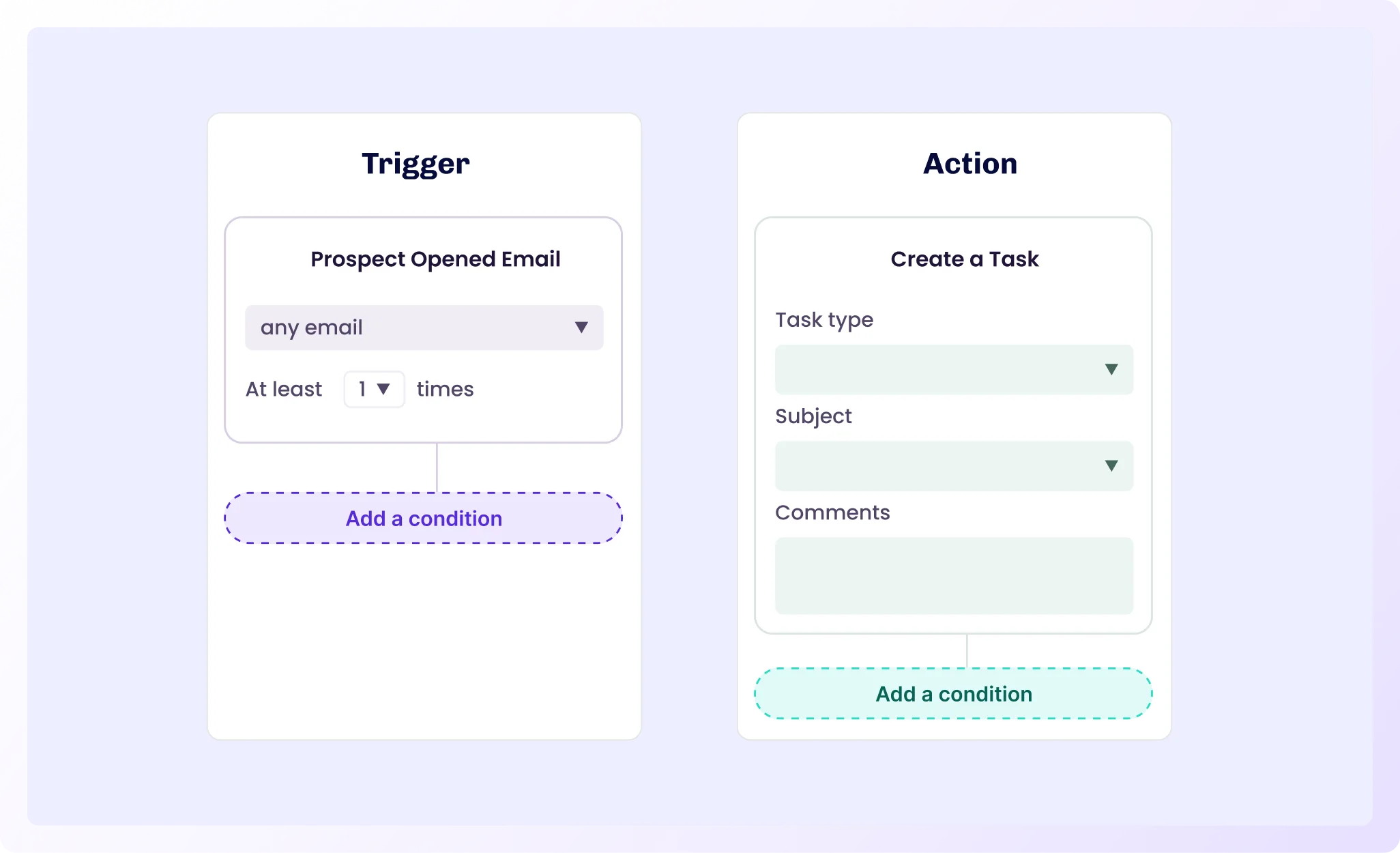
Klenty’s AI Playbooks automatically shift prospects to the right sequence based on their behavior.
Examples:
- A prospect who opens/replies → moves to a high-touch follow-up
- A cold lead → enters a long-term nurture sequence
- A demo request or CRM lead → gets slotted into the right outbound flow instantly
What sets Klenty apart is that the AI doesn’t just execute rules; it also suggests the next best step for each prospect. Based on engagement patterns, reply sentiment, and overall sequence performance, the platform can recommend whether to escalate, delay, personalize further, or move the lead into a different campaign. Your reps stay in control, but the system does the thinking for them.
This level of intelligent routing keeps your outbound engine agile and ensures every lead is followed up with the right message, at the right time, without falling through the cracks.
3. AI Agents That Execute Tasks for Your Reps
With Klenty, you get a team of AI Agents that execute all non-pipeline tasks across your outbound process, while your reps review, approve, and focus on pipeline-generating activities.
AI Agents build your account lists, find prospects and fetch emails and phone numbers, research accounts and prospects, write personalized emails, insert personalization into stale templates, and even take notes and summarize calls, so your team spends more time in conversations and less time on manual work.
4. Talk Track Tables
Talk Track Tables offers a clear, structured breakdown of call data, giving you an eagle-eye view of your reps’ performance.
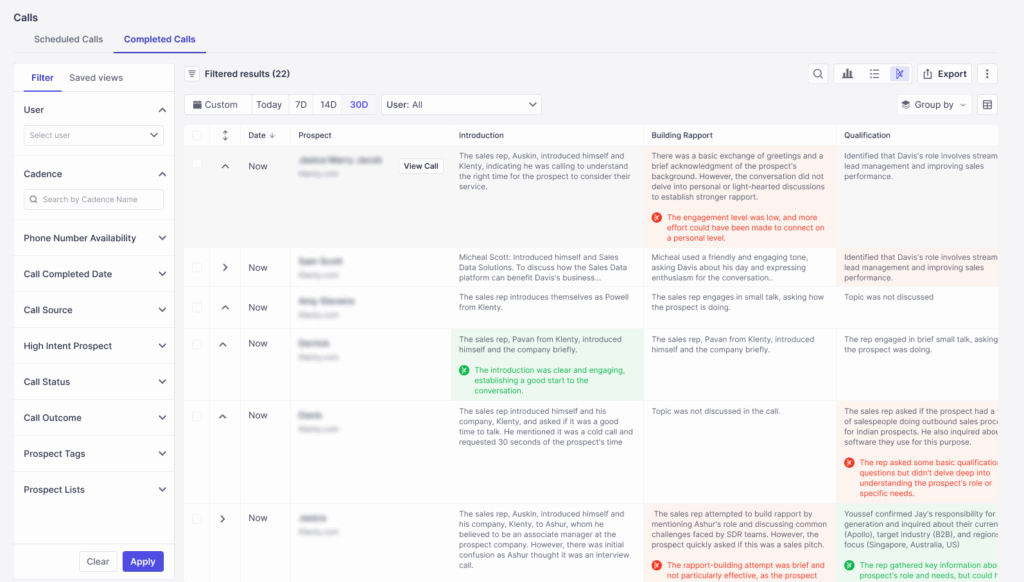
By transcribing and scoring calls based on clarity, engagement, persuasiveness, and data collection, Talk Track Tables turns unstructured data into actionable insights, allowing managers to instantly pinpoint strengths and improvement areas against an ideal standard.
Think of Talk Track Tables as an AI-powered SDR Analyst:
- Listening to hundreds of calls over time.
- Jotting down call details, breaking down calls into steps.
- Comparing what was done to what should have been done.
- Telling you where your reps need retraining or improvement.
With Talk Track Tables, sales managers can:
- Identify patterns that make great or bad cold calls.
- Identify skill gaps across reps based on consistent areas of weakness.
- See which openers, calls to action, and value prop delivery techniques yield the best results for converting calls to meetings.
- Ensure adherence to sales methodology and frameworks built into the AI (use our default frameworks or custom-build your own).
5. Email Deliverability Suite
Klenty provides a full-stack email deliverability suite to ensure your emails don’t end up in spam.
It handles everything from the initial setup to optimization:
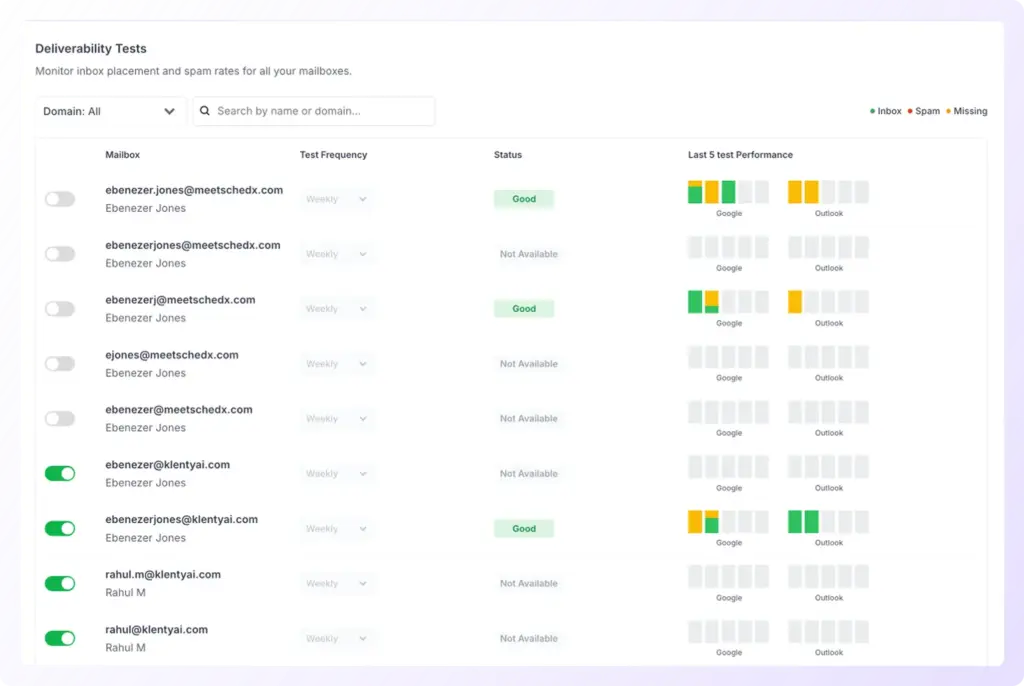
Email deliverability is improved using features like:
- Done-for-you domain and mailbox setup, including DKIF, DMARC, and SPF
- Auto-email warmup and Auto-inbox rotation
- Centralized domain-level and mailbox-level reporting
- Periodic optimization and on-demand deliverability tests
- Email throttling to mimic human-like send patterns
- Custom tracking domains and spam safeguard checks
Klenty provides deliverability insights showing the percentage of emails that land in the Primary Tab across different email service providers, along with suggestions for improving deliverability.
This goes beyond basic deliverability tools by giving actionable intelligence on inbox placement rates - something most competitors don't offer.
Additionally, Klenty's custom domain tracking helps build custom links and domains to avoid spam filters
6. AI Voicemail Detection
AI Voicemail Detection in Klenty is designed to handle high-volume dialing with maximum efficiency. This feature allows the dialer to auto-detect voicemails and instantly move on to the next call, saving valuable time and ensuring your team focuses on conversations that drive results.
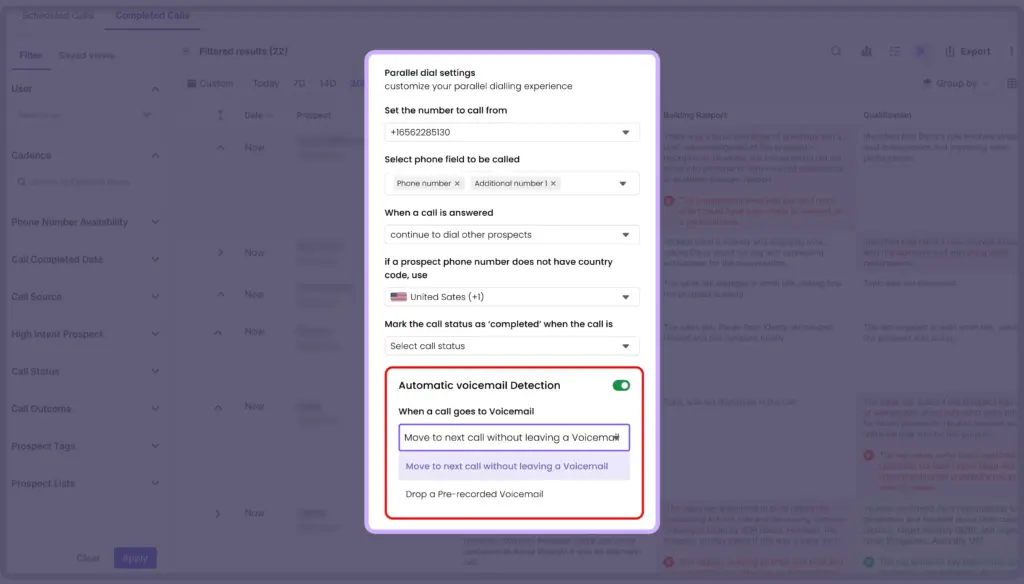
With Klenty’s AI Voicemail Detection, you benefit from:
- Instant Detection of Voicemail Greetings: The system identifies when a call reaches voicemail by recognizing standard greetings, allowing you to transition to the next call without delay.
- Pattern Recognition of Silence and Beeps: AI detects extended periods of silence or characteristic beeps typical of voicemail, ensuring your reps don’t spend time waiting for a response that won’t come.
- Advanced Speech Pattern Analysis: Klenty’s AI can distinguish the specific speech patterns associated with voicemail messages, further improving filtering accuracy so that sales teams only engage with live prospects.
- Automatic Filtering for Human Connects: Calls routed to voicemail are bypassed automatically, so every minute is spent on meaningful conversations with real people.
This feature can bypass up to 80% of calls that go to voicemail, maintaining your team’s momentum and supporting Power Dialer, Parallel Dialer, and Click-to-Call Dialer operations.
By leveraging AI voicemail detection, sales teams eliminate wasted time, optimize calling workflows, and dramatically improve connect rates.
7. CRM Integrations
Klenty connects with Salesforce, Zoho CRM, Pipedrive, and HubSpot, not through clunky zaps or middleware, but through purpose-built plugins and connectors designed for direct workflow efficiency.
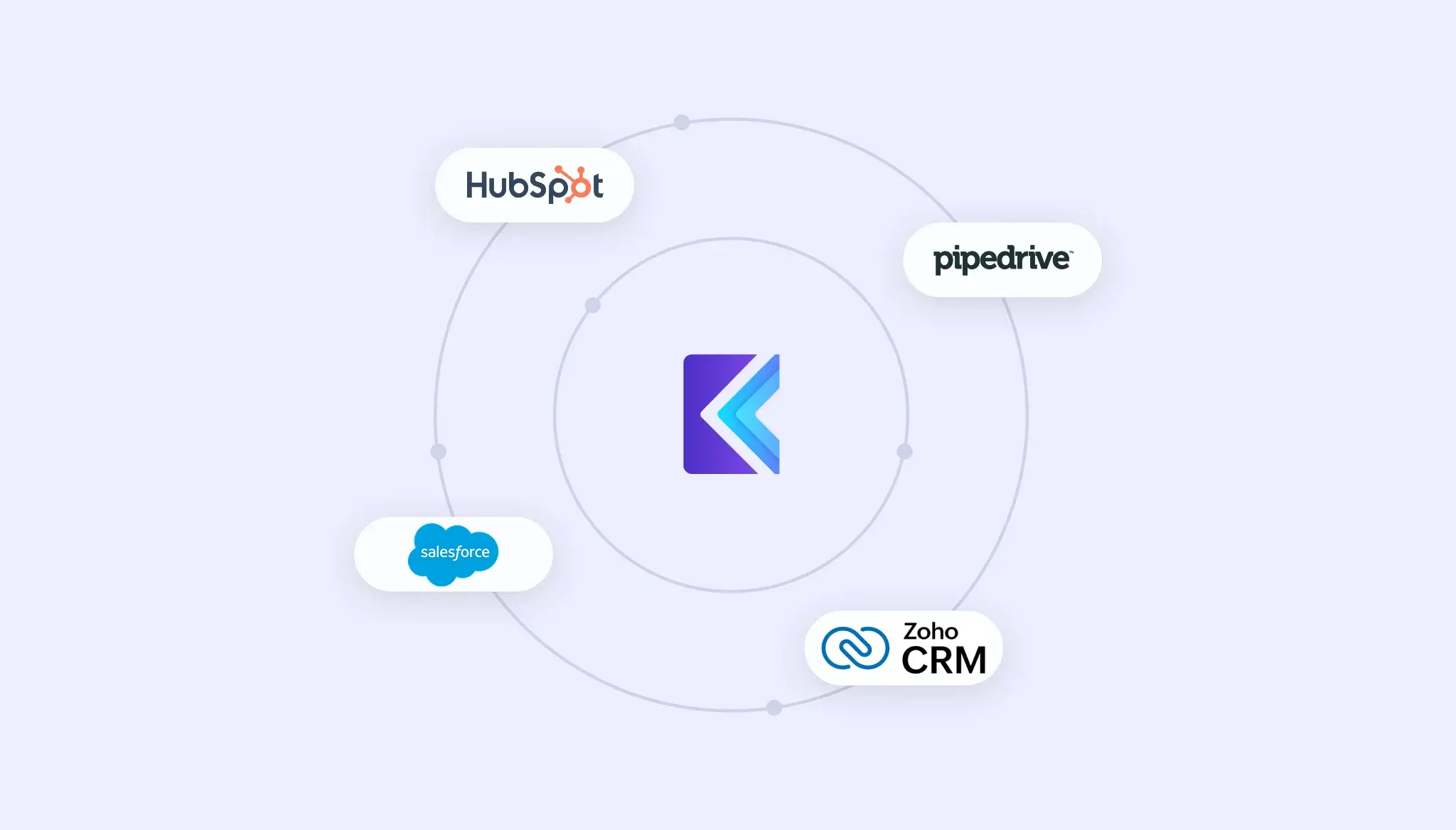
- Prospects can be imported from CRM into Klenty for streamlined campaign and outreach management.
- The integration allows users to personalize campaigns based on CRM data for every contact.
- Users can build and execute custom sales workflows directly from their CRM system.
- Activities and engagements in Klenty are automatically synced and updated in the CRM, maintaining complete and accurate sales records.
- Dedicated plugins allow reps to initiate, manage, and automate outreach directly within the CRM interface, eliminating unnecessary context switching.
- Sales activities, such as calls, tasks, and emails, are synced for comprehensive activity tracking.
Conclusion
By now, you’ve seen exactly how Apollo.io structures its pricing, including the features included at each level and what to watch out for when comparing your options.
The real question is: Does Apollo’s model give your team the automation, integrations, and support you actually need to hit your sales goals?
With Klenty, you can automate repetitive outreach, connect with prospects across email, calls, LinkedIn, SMS, and WhatsApp, and keep your CRM seamlessly updated, no manual import or data gaps.
You’ll design personalized multi-channel campaigns, accelerate follow-ups with behavior-triggered playbooks, and track team progress with clear goal-setting and live reporting. Klenty’s approach means you spend less time on manual tasks and more time building relationships and closing deals.
See how Klenty’s sales automation can maximize your outreach, simplify every step, and help your team hit their sales targets.
Frequently Asked Questions
What plans does Apollo.io offer?
How much does Apollo.io cost per user?
What do you get on the Apollo.io Free plan?
How do Apollo.io credits work?
How does Klenty fit into the picture if you’re evaluating Apollo pricing?
About the Author