
If you're looking to maximize your outbound calling productivity, selecting the right dialer matters more than ever.
With mounting pressure to hit your numbers, you might find yourself confronted by several challenges that slow your team down.
Are you also facing these troubles:
- Struggling to maximize dialing velocity, with reps spending too much time between calls?
- Low connect rates and difficulty reaching live prospects?
- Endless manual admin work, like leaving voicemails or syncing notes to your CRM?
- Reps having to manually create follow-up tasks and next steps after every call, leading to missed actions and inconsistent workflows?
- Challenges coaching reps, tracking talk track adherence, or staying on top of call activity targets?
In this blog, you’ll get a clear breakdown of the differences between Parallel Dialer vs. Power Dialer - their features, advantages, drawbacks, and use cases so you can see how they compare and choose the right option for your team’s needs.
Let's get started!
What Is Parallel Dialing?
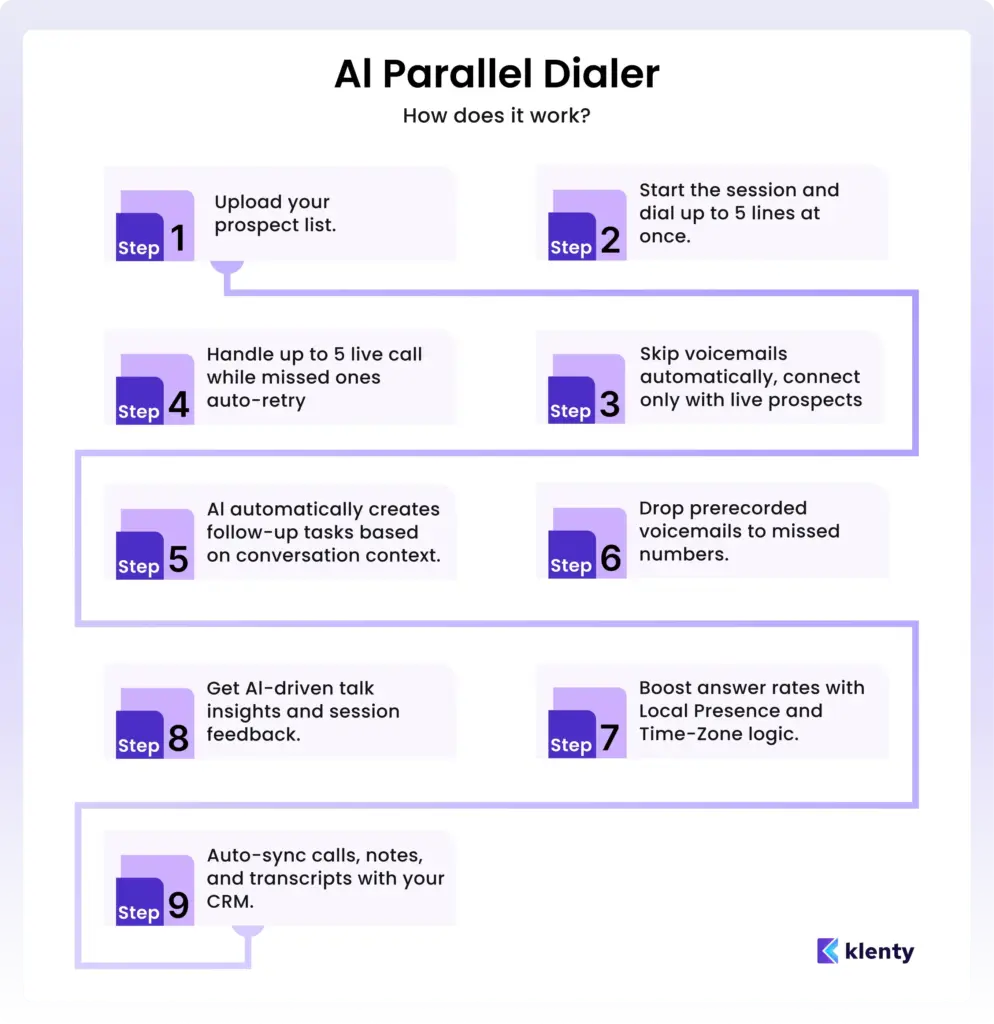
Parallel dialing is a calling method that lets sales reps dial multiple prospects at the same time instead of calling one number after another.
You can connect with a higher volume of prospects and reduce idle time between calls.
With a parallel dialer, sales reps can call up to 5 lines simultaneously, allowing you to make over 350 calls per hour. The system automatically detects when a call reaches voicemail and can drop a pre-recorded voicemail without wasting your time.
After a sales call, a Parallel Dialer also helps generate the right follow-up action automatically, such as scheduling callbacks, creating tasks, or logging reminders, so every conversation smoothly moves to the next stage in the sales process.
Key Benefits of Parallel Dialing
1. Increased call volume and improved connect rates
A parallel dialer enables you to make 300 to 350 calls an hour, allowing you to reach a much larger number of prospects in less time.
This dramatically boosts your chances of connecting with more people and driving more conversations in every session.
2. Reduced idle time for reps
With a parallel dialer, you eliminate the time wasted on dialing numbers, waiting through unanswered calls, clicking for each new call, or handling data entry.
Reps spend their time focused solely on engaging with prospects, not on repetitive admin work.
3. Scalability
As your business expands and outreach efforts grow, a parallel dialer helps you ramp up call volumes.
You can scale your outbound activities quickly and efficiently, keeping up with higher demand without sacrificing call quality or productivity.
4. Actionable follow-ups at scale
Even when dialing multiple prospects simultaneously, a parallel dialer can help ensure every conversation leads to the right next step.
The system can automatically generate follow-up action, like scheduling callbacks, creating tasks, or logging reminders, so your team never misses an opportunity, even during high-volume sessions. This keeps outreach organized and maintains pipeline momentum without extra manual work.
How Parallel Dialing Works
1. You start by dialing multiple numbers at once.
Using a parallel dialer, you initiate several calls simultaneously, letting you maximize your call volume right from the start.
2. You work through a homogeneous list of prospects.
You focus your parallel dialing sessions on lists where all prospects have similar characteristics, allowing you to tailor your pitch and handle multiple conversations.
3. You quickly qualify leads in large markets.
You use parallel dialing to rapidly engage, qualify, and collect information on prospects, helping you identify high-potential leads efficiently.
4. You leverage your experience to manage simultaneous conversations.
You juggle multiple live calls without sacrificing pitch quality, keeping high-velocity outreach effective and professional.You get an intelligent next step generated with AI.
After every call, the parallel dialer can automatically generate the right follow-up action, so every conversation leads to a clear step.
What Is Power Dialing?
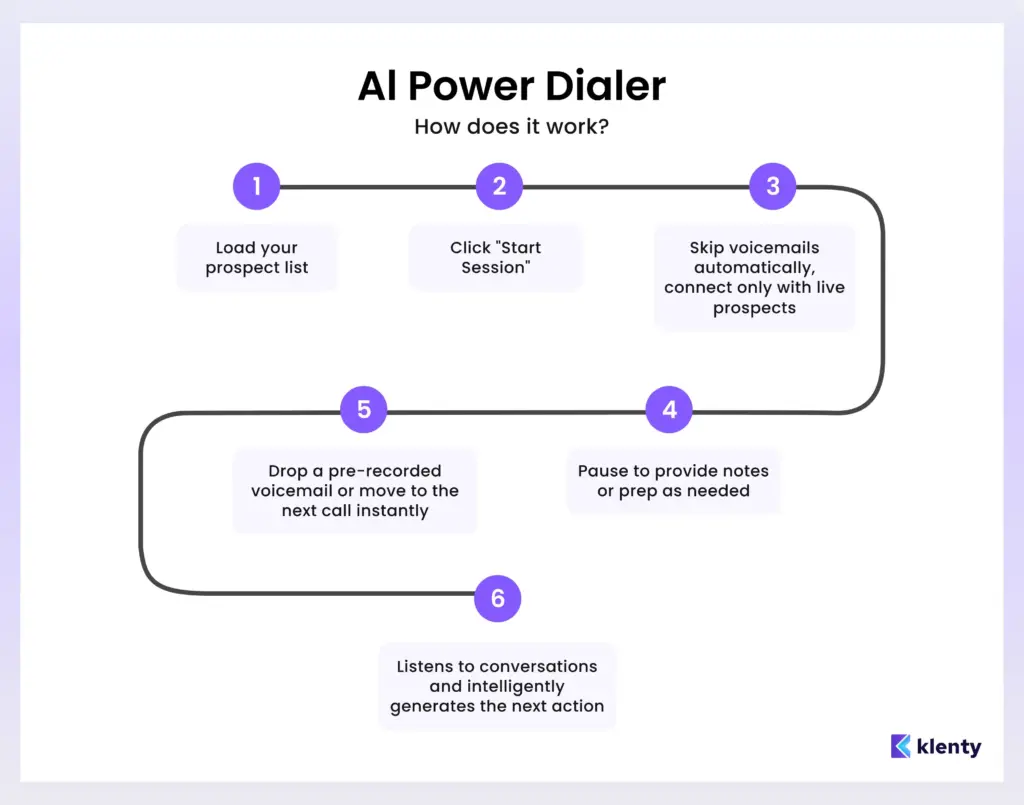
Power dialing is an automated calling method that dials contacts sequentially from a predetermined list, helping reps move from one call to the next without manual effort.
As soon as a call ends, whether it’s answered, goes to voicemail, or is disconnected, the Power Dialer immediately moves to the next number, simplifying your workflow and ensuring every dial counts.
Every conversation is recorded and transcribed, giving you powerful insights and keeping your focus on pipeline activities instead of administrative busywork, and instead of relying on reps to manually create next step after each call, a Power Dialer also helps generate the right follow-up action automatically, such as:
- Scheduling callbacks
- Creating tasks
- Logging reminders
so every conversation smoothly moves to the next stage in the sales process.
Key Benefits of Power Dialing
1. Control over dialing sessions
Power dialers give you complete control over your dialing sessions. You decide when to start, pause, and resume, ensuring you have enough time between conversations to add notes, review information, and prepare for your next call.
Every call is logged automatically, so there’s no need for manual CRM entry.
2. Personalized conversations
The Power Dialer lets you personalize every conversation. Before each call, you can review contact information and tailor your messaging, making every touchpoint more relevant and boosting your chances of a successful outcome.
3. Ease of Use
Power dialers are incredibly easy to use and set up, so you can start making calls with minimal onboarding. This makes them especially accessible for smaller sales teams or individual reps who want to focus on conversations, not figuring out a new tool.
4. Actionable follow-ups at scale
Instead of relying on reps to manually create follow-up tasks after every conversation, Klenty’s Action AI also helps generate the right next action automatically, such as scheduling callbacks or creating reminder tasks, so every call moves smoothly to the next step in the sales process.
How Power Dialing Works
1. You start your calling list.
The AI Power Dialer automatically dials one number after another. As soon as a call ends, your next call is dialed instantly.
2. You pause and prepare between calls.
After each call, you have the freedom to pause, take notes, review prospect information from your CRM, and get ready for your next conversation.
3. You personalize every conversation.
Before each call, you can instantly see prospect details, letting you tailor your approach and improve your chances of a productive discussion.
4. You let the system handle your logging and CRM sync.
Every call, every note, and outcome is logged automatically in your CRM, giving you a complete, updated view of prospect interactions.
5. You control your dialing speed.
Dial at your pace and move smoothly between quality and quantity, scaling up your calling while keeping each conversation intentional and effective.
6. You get an intelligent next step generated with AI.
After every call, the system can automatically generate the right follow-up action, ensuring every conversation leads to a clear step without manually deciding what to do next.
Key Differences Between Parallel Dialer vs. Power Dialer
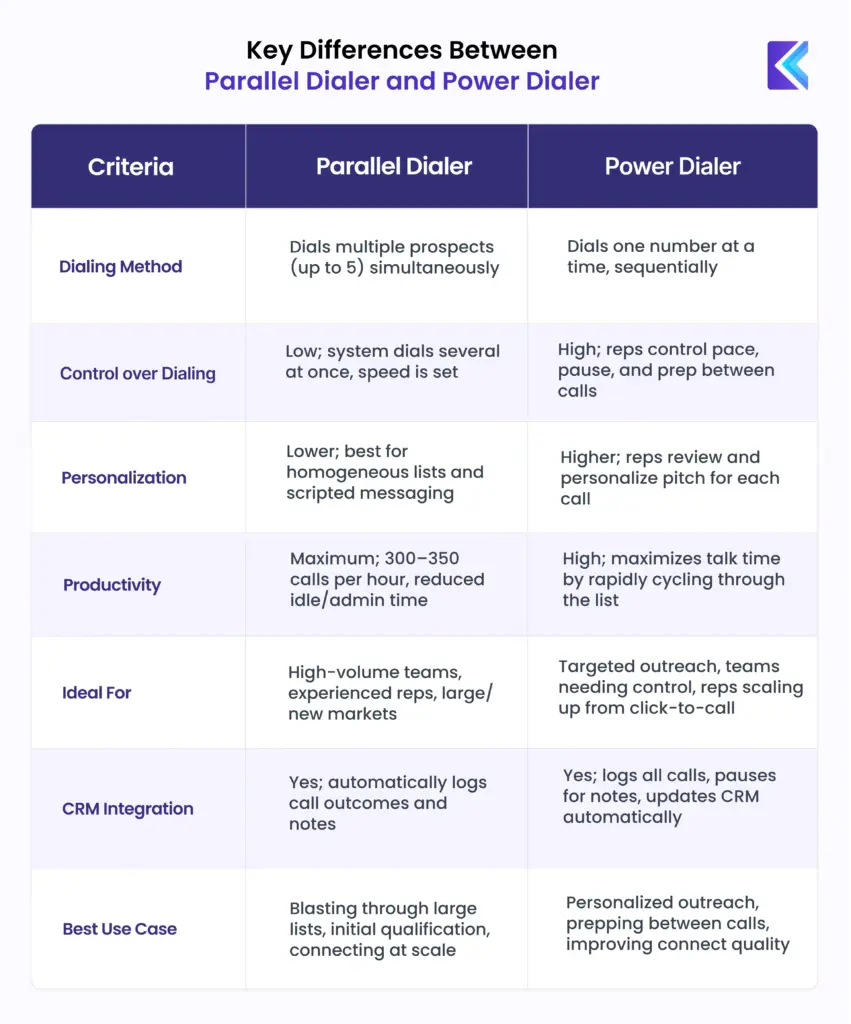
Both parallel dialers and power dialers are designed to help sales teams automate and scale outbound calling, but they differ significantly in their dialing method, level of control, personalization, and ideal use cases.
Parallel dialing calls multiple prospects at the same time, allowing sales reps to connect with more people and significantly reduce idle time between calls. By dialing up to 5 lines simultaneously, teams can make over 350 calls per hour, drop pre-recorded voicemails automatically, and keep every conversation moving forward with auto-generated follow-ups like callbacks, tasks, or reminders.
Power dialing, on the other hand, calls one prospect at a time and automatically dials the next number as soon as a call ends. This makes it ideal for sales teams that want more control, time to review details, and the ability to focus on personalized, high-quality conversations rather than speed.
Below is a comprehensive table that highlights the core differences of Parallel Dialer vs. Power Dialer, so you can choose the best solution for your team’s unique outreach goals.
Best Use Cases for Parallel Dialer and Power Dialer
Parallel dialers and power dialers serve different outbound goals, depending on your team’s calling volume, need for control, and level of personalization required.
While a parallel dialer is best suited for high-volume outreach where speed and connect rates matter most, a power dialer is ideal for teams that prioritize control, preparation, and personalized conversations.
Each dialer shines in specific scenarios. Understanding where each one fits best helps you design outreach that balances speed, efficiency, and conversation quality.
Best Use Cases for Parallel Dialer:
1. Maximizing Call Volume in High-Competition Industries
If your team needs to reach a large pool of prospects, such as in SaaS, B2B tech, or competitive outbound environments, a parallel dialer is ideal. It enables your team to make up to 300–350 calls per hour, dramatically boosting your outreach and the likelihood of connecting with more prospects in less time.
2. Targeting Homogeneous Lists
Parallel dialers work best when you are calling lists where the prospects share similar characteristics, such as industry, company size, or location. This uniformity allows your team to deliver a consistent pitch across multiple simultaneous conversations, saving time and increasing message relevance.
3. Initial Outreach for Large Total Addressable Markets (TAM)
When you need to quickly qualify leads from a broad list, for example, if you’re entering a new market segment, a parallel dialer helps you have multiple quick conversations, gather qualification data, and efficiently filter out unqualified leads, saving valuable resources.
4. Experienced, High-Velocity Sales Teams
Teams with seasoned SDRs who are comfortable with high call volumes and can manage several live calls at once see the greatest benefit with a parallel dialer. Their expertise enables them to handle objections and keep conversations effective, maximizing productivity without sacrificing quality.
Best Use Cases for Power Dialer:
1. Targeted Outreach Campaigns
Power dialers are perfect for sales teams running targeted outreach, where a level of personalization is needed with each call. You can automatically dial prospects and instantly view their CRM details, allowing you to tailor every conversation and increase your chances of a meaningful interaction.
2. Teams Requiring Control Over Dialing Speed
If your team values the ability to control the pace of calls, pausing to make notes, review information, or prepare for the next conversation, a power dialer is the right fit. Since it calls one number at a time and waits for your input before moving to the next, you can ensure every conversation gets the attention it deserves.
3. Scaling Click-to-Call Workflows
For teams that are comfortable with click-to-call dialing but want to scale up their efforts, power dialers provide a natural progression. You get the balance of increased call volume without losing touch with prospects by rushing through calls, making it ideal for those not ready for the pace of parallel dialing.
4. Smaller Sales Teams or Reps New to High-Volume Calling
Because power dialers are simple to use and easy to onboard, they’re well-suited for smaller teams or sales reps transitioning into higher volume dialing. You can increase your productivity with minimal admin effort and without becoming overwhelmed.
Quick Summary: Choosing Parallel Dialer vs. Power Dialer
After exploring the ideal use cases for each dialer in detail, the table below provides a quick, side-by-side summary of how Klenty’s Parallel Dialer and Power Dialer differ across key factors.
Use this snapshot comparison to quickly identify which dialer best aligns with your team’s outreach goals and calling strategy.
| Use Case | Parallel Dialer | Power Dialer |
|---|---|---|
| Primary Outreach Goal | Maximizing call volume and connect rates in a short time | Running targeted, high-quality outreach with thoughtful conversations |
| Ideal Campaign Type | Initial outreach, market entry, lead qualification for large lists | Targeted outreach campaigns requiring personalization |
| List Type | Homogeneous lists where prospects share similar traits (industry, size, location) | Curated or segmented lists where context matters for each call |
| Call Volume & Pace | Very high volume (up to 300–350 calls per hour) with system-controlled speed | Moderate to high volume with rep-controlled pacing |
| Level of Control | Low control over dialing speed; system dials multiple prospects simultaneously | High control; reps decide when to start, pause, and move to the next call |
| Personalization Level | Lower personalization; best suited for consistent, repeatable messaging | High personalization; reps review CRM details and tailor each conversation |
| Sales Team Experience | Best for experienced, high-velocity SDR teams comfortable handling multiple calls | Ideal for smaller teams or reps transitioning into higher-volume calling |
| Workflow Fit | Rapid qualification and filtering of unqualified leads at scale | Scaling click-to-call workflows without overwhelming reps |
| Conversation Quality Focus | Speed and reach over depth | Conversation quality and preparation between calls |
| Best Overall Use Case | Blasting through large prospect lists, early-stage outreach, TAM coverage | Personalized outreach, controlled dialing, and improving connect quality |
Why Choosing the Right Dialer Matters
In outbound sales, your dialer is the engine that drives your pipeline. Choosing the right dialer can make or break your team’s productivity, connect rates, and overall revenue.
A top-performing dialer should deliver five critical value propositions that directly impact your sales outcomes:
1. Improve Dialing Velocity
The faster your reps can get through their lists, the more conversations they can have each day. High-speed dialing increases touchpoints without burning out your team.
2. Improve Connect Rate
Getting a call answered is half the battle. A dialer that increases connect rates ensures your reps spend time talking to real prospects instead of hitting voicemails or wrong numbers.
3. Orchestrate Next Steps
Outbound sales also includes following through efficiently. Your dialer should intelligently capture outcomes and create the next action after each conversation, so no opportunity falls through the cracks.
4. Switch Between Dialing Modes With Ease
Different campaigns require different dialing strategies. Whether it’s high-volume parallel dialing, focused power dialing, or personalized CRM-based calls, your team should be able to switch seamlessly to maximize results.
5. Reduce Admin
Manual logging, tracking, and follow-ups waste time and slow down pipeline growth. The right dialer should automate administrative tasks, freeing reps to focus entirely on conversations that generate revenue.
Klenty delivers on all of these value propositions. Let’s take a closer look at how Klenty empowers your team to dial smarter, connect better, and spend less time on busywork:
Why Is Klenty Your Best Choice?
Klenty is built to help you focus entirely on pipeline activity, maximizing dialing velocity, boosting connect rates, eliminating admin with AI, and providing every coaching tool you need to guarantee your team follows a winning process.
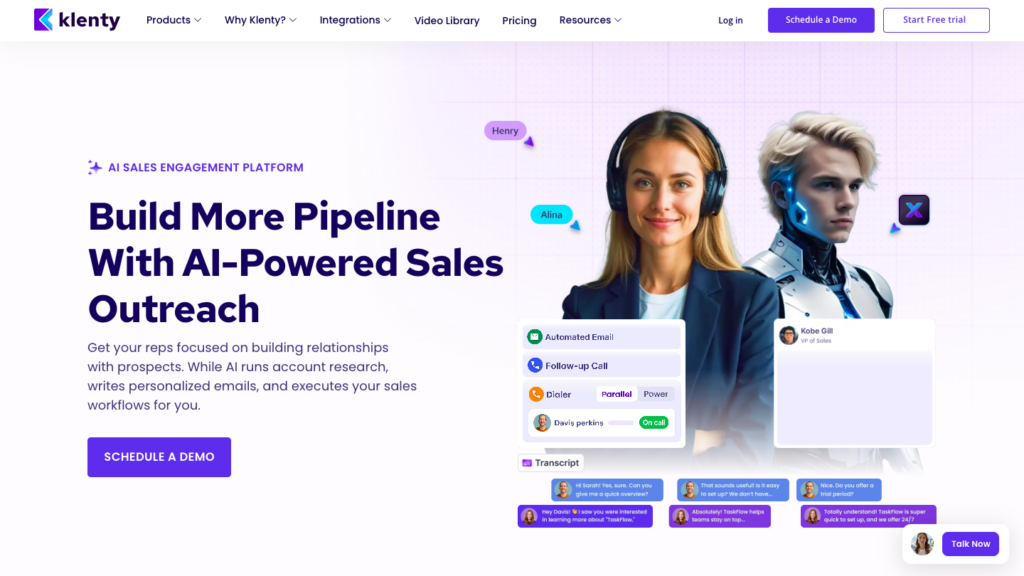
With Klenty, you free your reps from busywork and get them spending more time in real conversations that book meetings and grow your pipeline.
Here’s how Klenty delivers real pipeline results:
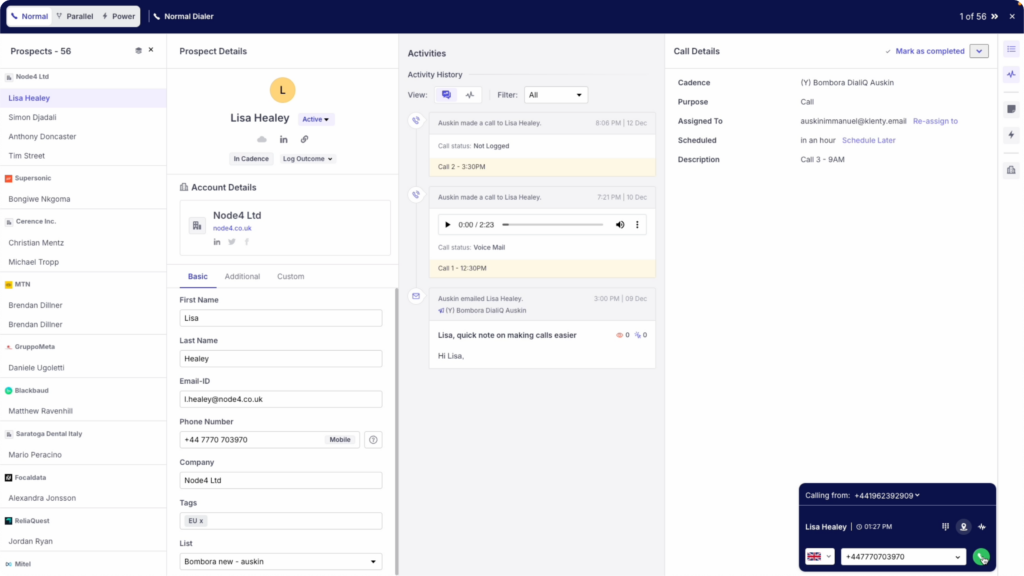
1. Maximize Dialing Velocity
Parallel Dialer: Dial up to 5 prospects at once to reach 5x more contacts in every calling session. Benefit from multi-line simultaneous dialing designed for speed, making hundreds of calls per hour and maximizing daily outreach, especially for high-volume teams working large lists or competitive markets.
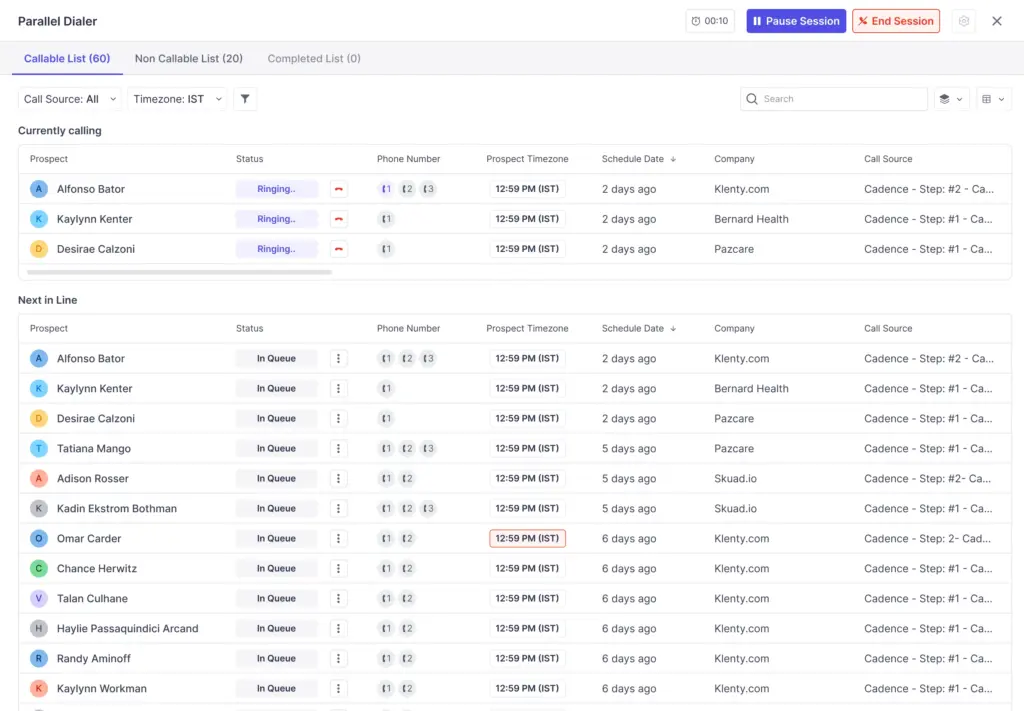
Power Dialer: Move through your prospect list automatically, one by one, without manual intervention. This ensures each call is placed efficiently, reducing idle time and letting you clear through large lists with the pace and control needed for targeted or personalized campaigns.
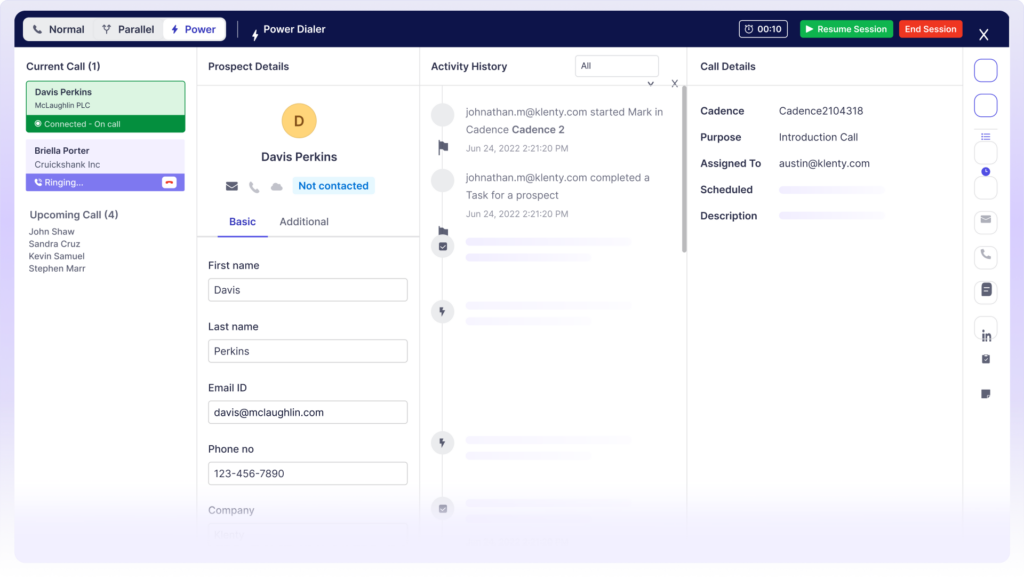
Click to Call Dialer: Need personal, high-context follow-ups? With Klenty’s Click to Call Dialer, you can initiate a call from any CRM record or active sales sequence. Reps can click-to-dial individual prospects with all relevant info in front of them, perfect for tailored outreach.
2. Maximize Connect Rate
Choose a Local Number: With Klenty’s Local Presence Dialing, you automatically reach every prospect using a number that matches their specific area code, not just a generic local number. This feature selects the right “from” number for each region, maximizing answer rates and instantly building trust, so you always show up as part of your prospect’s community, no matter where they are.
That “I’m one of you!” first impression increases engagement and can lead to longer, more meaningful conversations right from the start.
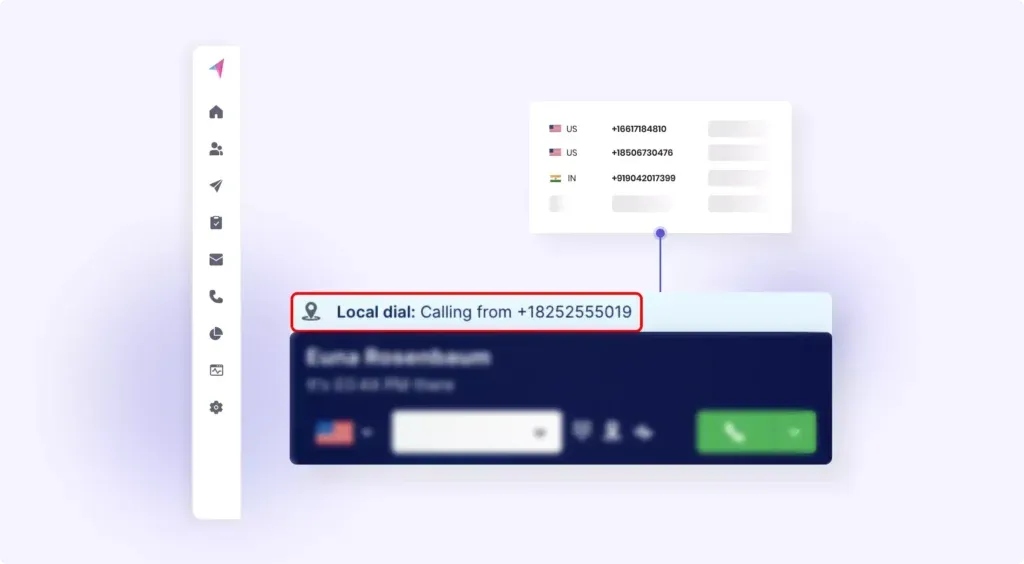
Klenty’s Timezone Detection lets you batch prospects based on their geography and place calls only during their local business hours. This means you avoid calling at the wrong time and boost connect rates automatically. By continuously rotating and managing a pool of local numbers for all your target regions, you maintain compliance, avoid spam flags, and make callbacks seamless for prospects.
The result: every prospect gets a local call at the right time, with the right caller ID, helping you spark more conversations, convert more leads, and drive better sales outcomes with every call.
Pre-recorded voicemails: Drop pre-recorded voicemails with one click when you hit voicemail, making sure no lead is missed and boosting your callback rates without tying up your reps’ time.

3. Reduce Admin Work With AI
Save countless hours with auto voicemail detection and 1-click voicemail drop, no more sitting through voicemail greetings or wasting time on manual outbound messages. Rotate through multiple “from” numbers so your calls avoid spam tagging, maintain caller ID freshness, and reach prospects more reliably.
AI-Based Live Voicemail Eliminator : Klenty uses AI-powered voice transcription to detect whether a live human answers or if the call hits voicemail. This means reps don’t waste time waiting for the beep; the dialer simply skips to the next prospect, ensuring every second is spent finding real conversations.
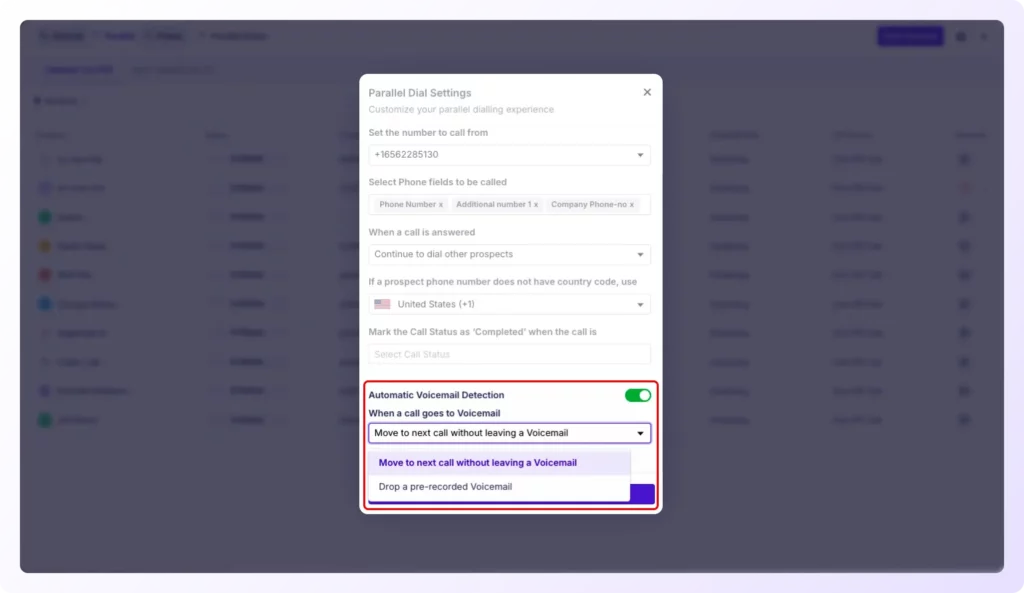
This feature reflects the 2026 outbound playbook’s focus on minimizing non-pipeline activity: letting SDRs concentrate entirely on conversations that generate revenue while AI handles the rest.
Every call is automatically transcribed, and AI-powered call summaries are generated, so you capture insights, coach your team, and review conversations without listening to every recording.
AI-Based Next Step Execution
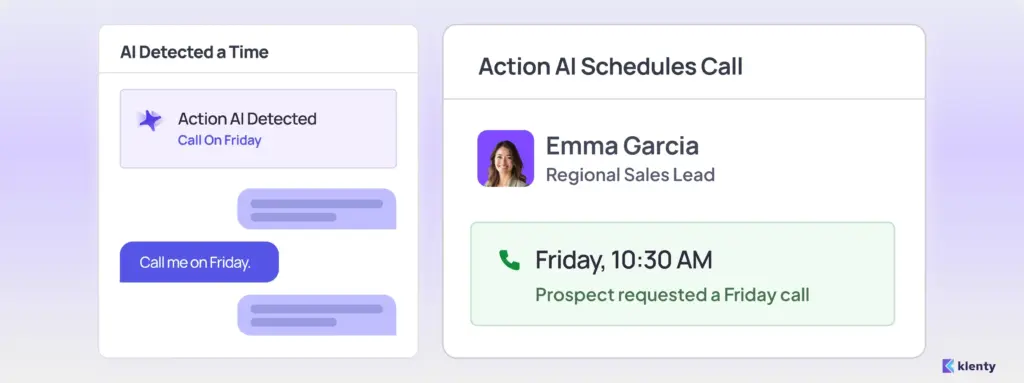
Klenty’s Action AI listens to your sales conversations, understands what was discussed on the call, and intelligently generates the next action. You can focus on dialing, not managing next steps, execute the right tasks at the right time, and save time with auto-generated follow-up messaging.
Time-Based Next Actions
Prospect says, “Call me on Friday.” → Action AI schedules a call for Friday with the prospect.
Channel-Based Next Actions
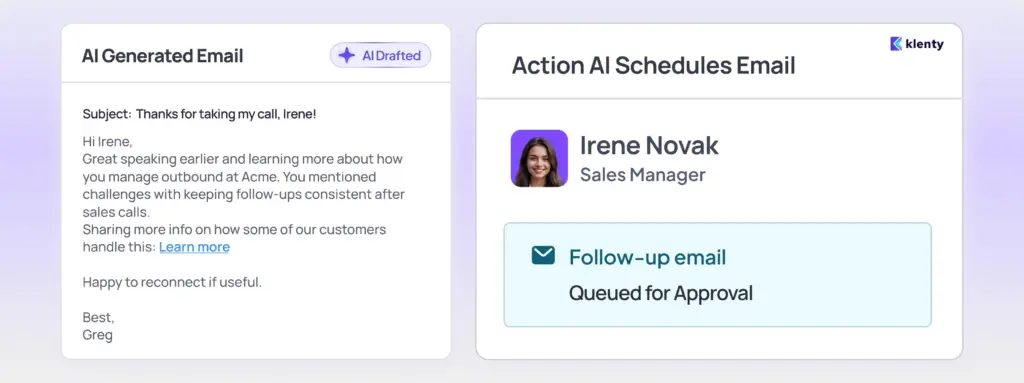
Prospect says, “Send me an email.” → Action AI creates a personalized email and queues it up for approval.
Context-Based Next Actions
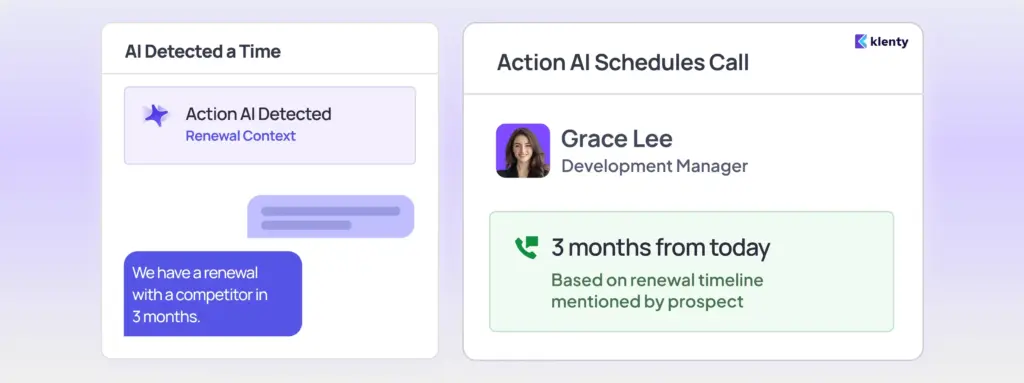
Prospect says, “We have a renewal with a competitor in 3 months.” → Action AI schedules a call in 3 months with call context.
4. CRM Integrations
Klenty deeply integrates with leading CRMs including Salesforce, HubSpot, Pipedrive, and Zoho. All call activity, recordings, outcomes, and notes sync automatically, eliminating manual entry, reducing admin work, and ensuring complete visibility into every prospect touch.
5. Coach Reps With Intelligence
Gain customizable call summaries that capture every important detail and insight relevant to your workflow, making pipeline reviews fast and effective.
Talk Time vs. Dial Time Reports
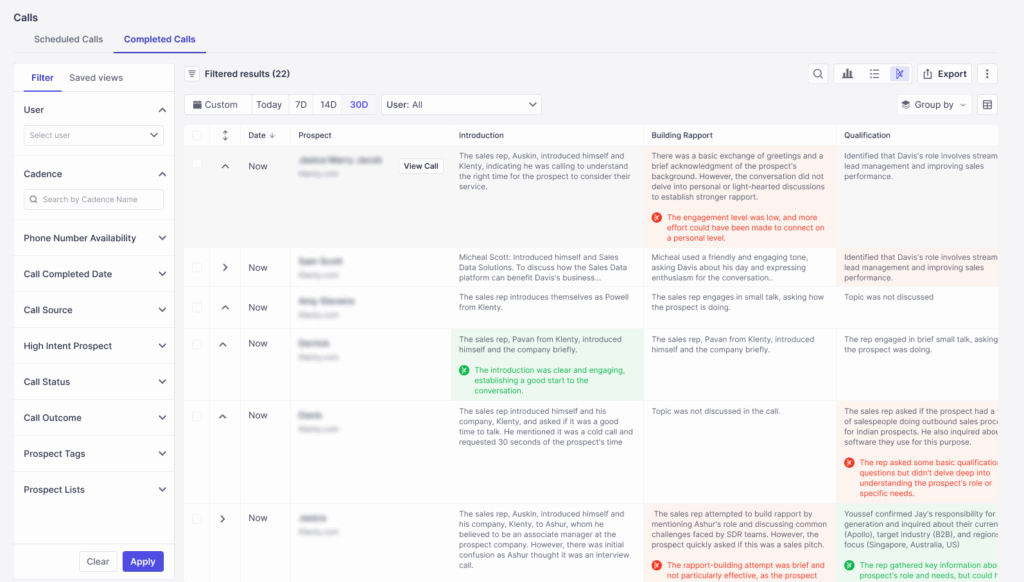
At the end of every session, reps receive detailed reports that show total dials, number of live connects, and the ratio of time spent dialing versus actually talking. Managers can easily see where their team’s time is going, measure productivity, and coach reps on improving connect rates and conversation quality.
These insights align with Klenty AI’s approach to transform SDRs from task-doers to approvers, letting them focus on pipeline activity while AI Agents capture the operational data automatically.
Set weekly and monthly call activity targets for every rep, track them in a single dashboard, and ensure accountability to KPI goals without endless spreadsheets.
Access immediate, in-depth reporting at the list, cadence, account, and rep level so you can identify strengths, spot coaching needs, and scale best practices across your team.
Conclusion
With Klenty, you don’t have to compromise. Easily switch between Parallel and Power Dialing based on campaign goals, prospect lists, or rep experience, ensuring you always have the right tool for the task, backed by automation, AI, and actionable insights.
Beyond dialing, Klenty helps your team automatically capture every call outcome and generate the right next-step action, such as callbacks, follow-up tasks, or reminders with Action AI, so reps spend more time in meaningful conversations and less time on manual admin. This ensures every conversation moves the pipeline forward and no opportunity is missed.
Ready to supercharge your outbound calling?
Experience how Klenty’s Parallel Dialer and Power Dialer can help your sales team scale outreach and build more pipeline. Book a demo today and discover your best-fit dialing solution.
FAQs
What is the core difference between a Parallel Dialer and a Power Dialer?
Which dialer delivers higher connect rates: Parallel or Power Dialer?
Is a Parallel Dialer better for high-volume outbound teams than a Power Dialer?
Does Parallel Dialing affect call quality or conversation quality compared to Power Dialing?
When should teams choose a Power Dialer instead of a Parallel Dialer?
About the Author