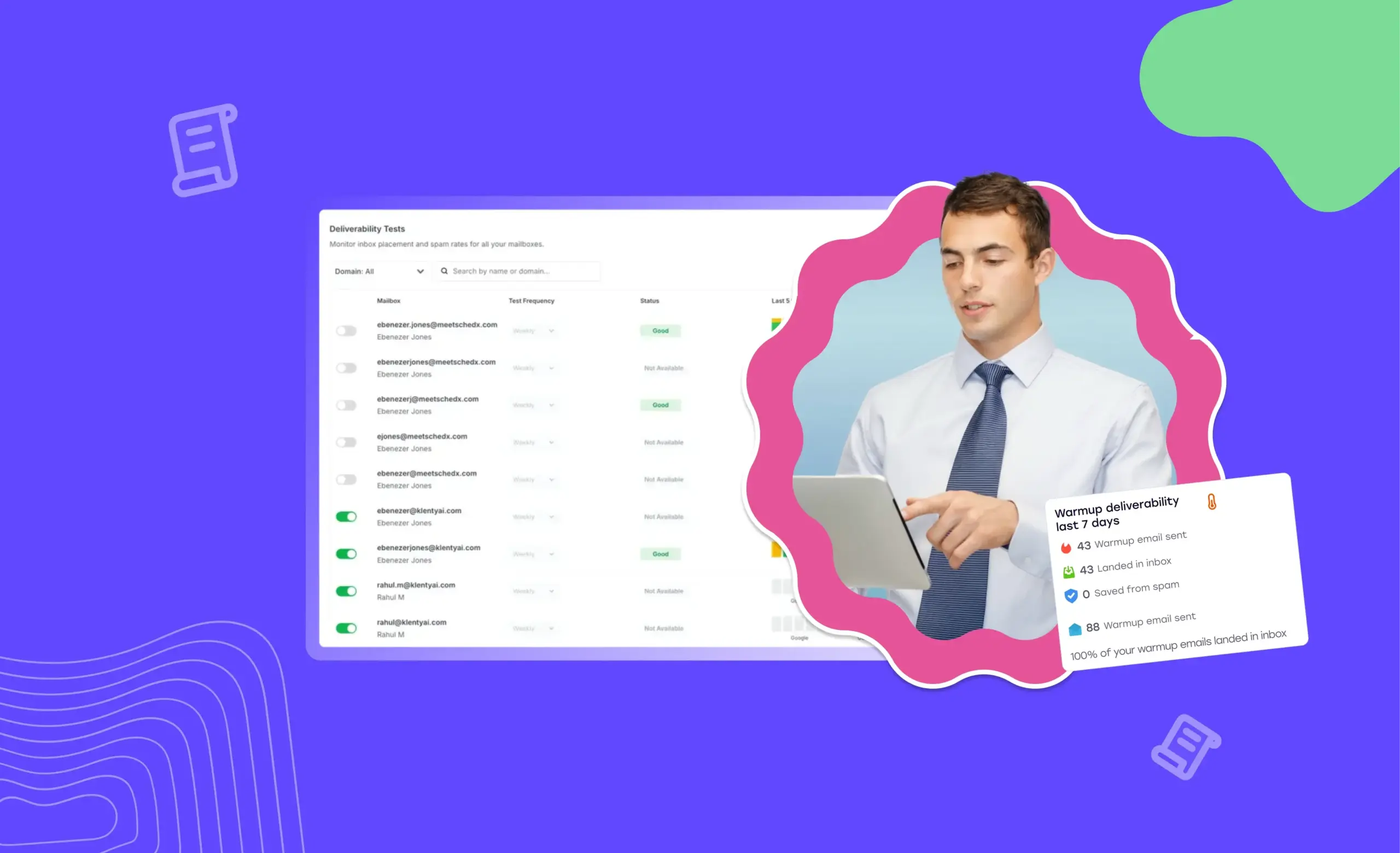
So, you’re researching your prospects, curating perfect cold emails, optimizing your subject lines, ensuring they’re free of clickbait, and sending them at just the right time. But your open rates, response rates, and booked meetings still don’t reflect all that hard work.
Two words: email deliverability.
Your email might be meticulously crafted, but if it lands in the Promotions tab or, worse, the spam folder, it’s as good as unseen. Your target is your prospect’s Primary Tab, period. Anything else is a dark abyss where your outreach goes unnoticed.
To fix this, you need to ensure your cold email deliverability is optimized.
This cold email deliverability guide walks you through everything you need to know about getting your cold emails to reach their destination, and how you can improve your deliverability rate to make every send count.
Let’s start by understanding what cold email deliverability really means.
What Is Cold Email Deliverability?
Cold email deliverability measures how many of your cold emails actually reach your prospect’s Primary Tab inbox, not the Promotions tab or spam folder, but the space where genuine conversations begin.
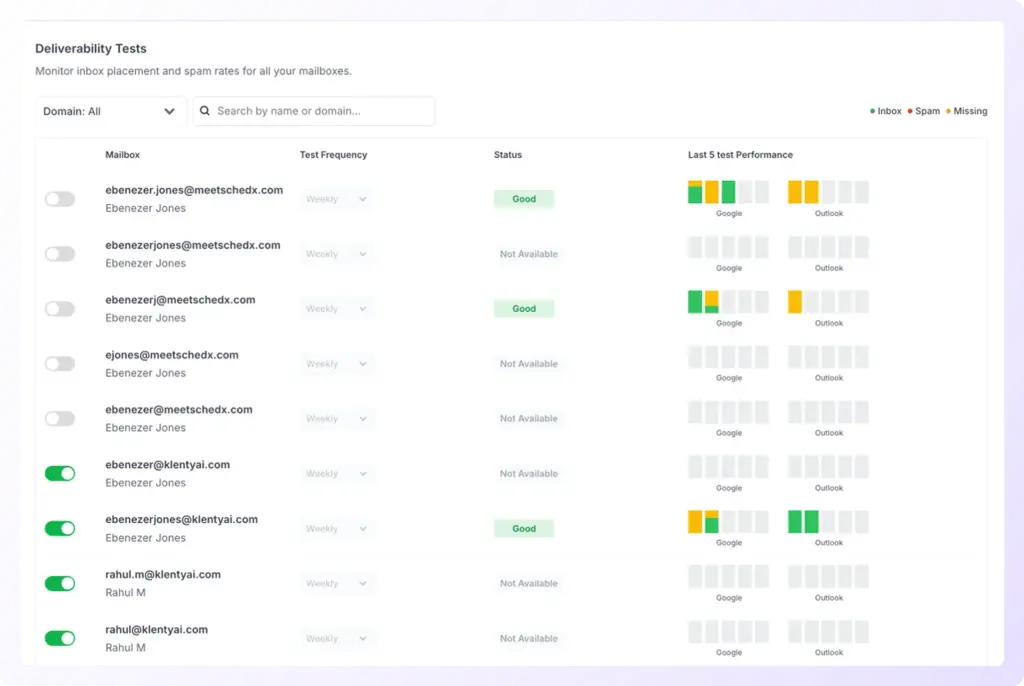
For Sales Development Representatives, this is one of the most critical metrics because it directly influences how much pipeline your outreach generates. If your emails don’t land in your prospect’s inbox, nothing else- your copy, call-to-action, or timing, matters.
Email deliverability forms the foundation of your outbound ROI. It determines whether your emails even have the chance to convert into replies, meetings, and, eventually, revenue.
How Does Cold Email Deliverability Work
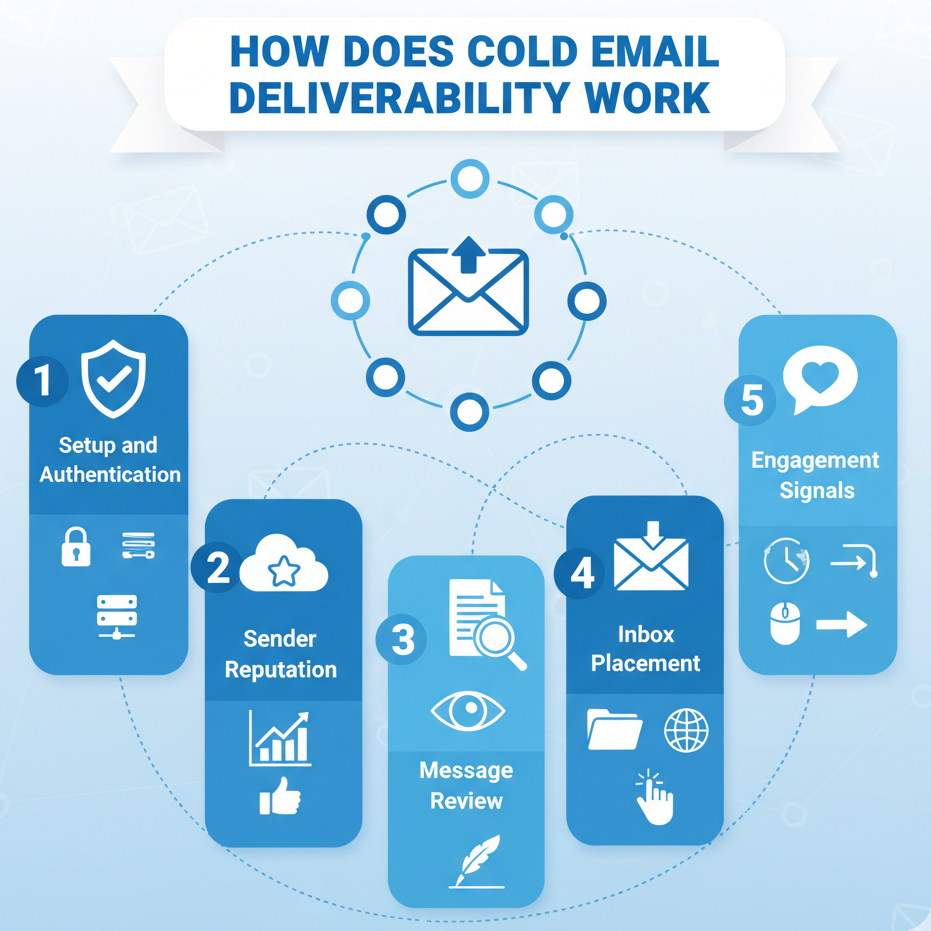
Email deliverability begins long before you send an email. It is the process that ensures your message is authenticated, verified, and delivered safely to your recipient’s inbox rather than being flagged as spam. Below is the step-by-step breakdown of how it works:
1. Setup and Authentication
You must configure domain authentication using SPF, DKIM, and DMARC to verify your identity as a legitimate sender. Use business domains instead of free email accounts and maintain a clean contact database with verified addresses to prevent bounces.
2. Sender Reputation
Email service providers (ESPs) evaluate how consistently and responsibly you send emails. High bounce rates, spam reports, and irregular sending patterns reduce your reputation score, which can prevent your emails from reaching inboxes.
3. Message Review
Once sent, your message is scanned by ESP filters. They verify your authentication status, sender reputation, message content, and links to ensure it follows compliance and trust guidelines.
4. Inbox Placement
Based on these checks, your email is placed in:
- The primary inbox, if it passes all trust and quality standards.
- The promotions or spam folder, if flagged for low relevance or poor reputation.
- Blocked if the sender fails security or trust validation.
5. Engagement Signals
Recipient actions: opens, replies, and clicks are key deliverability signals. Higher engagement improves your sender reputation over time, while ignored or marked-as-spam emails lower it.
What Affects Your Cold Email Deliverability
4 factors influence your cold email deliverability rate. To understand how you can improve the chances of your email landing in the prospect’s primary inbox, you must first examine these factors.
1. Email Authentication
Email authentication is the process of verifying that emails originate from a legitimate source. It’s what tells inbox providers you’re a trusted sender, not a spammer trying to impersonate a domain. Think of it as your digital passport to your prospect’s inbox.
In email deliverability, authentication ensures that your outbound messages are verified at the protocol level. It’s one of the most foundational defense layers against phishing, spoofing, and deliverability failures.
Three authentication protocols: SPF, DKIM, and DMARC, work together to validate your authority to send emails from your domain.
- Sender Policy Framework (SPF) verifies whether the IP address sending your message is authorized to do so. It’s basically a list of trustworthy senders attached to your domain’s DNS. A properly configured SPF record helps internet service providers confirm that your email is genuine and keeps it out of the spam folder.
- DomainKeys Identified Mail (DKIM) adds a digital signature to each email. This cryptographic signature proves that your message wasn’t altered in transit and that it indeed came from your verified domain.
- Domain-based Message Authentication, Reporting & Conformance (DMARC) ties SPF and DKIM together. It instructs receiving mail servers on how to handle emails if either of those verifications fails, whether to quarantine, reject, or deliver the email. It also enables detailed reporting on your domain’s authentication status, providing insights into any unauthorized sending activity.
2. Email Sender Reputation
The adage “Your reputation precedes you” has never been as important as it is now. Internet service providers (ISPs) consider your emails’ past performance when determining if the security barrier should be raised for you.
If your emails enjoy a high open rate, high click-through rate, low spam folder visits, fewer spam complaints, and low bounce rates, your email reputation will be strong enough for your email to don sunglasses and strut right into your prospect’s inbox. If not, you’re not making it in.
So, what can be done?
You can optimize the following factors influencing your email sender reputation.
Email Engagement
Past engagement is the driving factor for a good email sender reputation. So, naturally, ensuring your email engagement is positive can help you attain and maintain a high sender reputation.
In other words, ensure your emails get opened, prospects interact with them, either by clicking a link or replying (depending on your CTA), and don’t banish them to the spam folder or hit ‘unsubscribe’.
Domains and Blocklists
Firstly, ensure your email address doesn’t look suspicious but professional and legitimate. Your email address should be with your organization’s domain or sub-domain.
For example, [email protected] or a related sending domain, like [email protected].
Next, your domain should avoid the blacklist, very literally. A domain blacklist (also called a domain blocklist) is a list that allows ISPs to block emails from domains that typically send spam.
Your domain may also be blacklisted due to the gradual degradation of the domain's reputation itself. This mostly happens because of sending many emails from a particular domain that have been classified as spam.
If your domain is blacklisted, you will need to delist your domain. This can be done by contacting the blacklists and requesting to be removed from them.
3. Email Bounce Rate
Your cold email bounce rate refers to the number of cold emails that didn’t make it to your prospects’ inboxes. As a result, you might receive an error or a non-delivery report (NDR) informing you that your email never reached its destination.
If only that were the end of the story. But it’s not. A high bounce rate can negatively impact your cold email deliverability rate, so keeping it low must be prioritized. How do you do that? By ensuring your list of prospects’ emails is up-to-date.
Stale or old email lists can mean you’re sending cold emails to addresses that might not be in use anymore, and so when your email can’t reach its destination, it’s going to come back with an added point to your bounce rate.
4. Importance of Email Content
Email service providers (ESPs) like Gmail, Outlook, etc., are sentries looking to authenticate all emails before they go through to your prospect’s inbox. And they check everything, from your email’s header and attachments to its URLs and images.
And hence, your email content is pretty much fair game for these ESPs. If you don’t ensure your email content is optimized and free of spammy language, it might get caught at the gate itself.
Including words such as "buy now," "free," "save $," etc., in your email is begging to get noticed by your email service provider. And if it goes through, it runs the risk of getting sent to the spam dungeons.
So, how to avoid spam filters? Through relevant and personalized content. Ensure your email content is value-driven and you effectively sidestep the spam folder while building sender reputation.
How To Improve Your Cold Email Deliverability
When it comes to cold email deliverability, having the right setup, infrastructure, and real-time protection can make or break your outreach success.
That’s where Klenty comes in.
Klenty offers an Email Deliverability Suite that works before, during, and after your outreach. It’s an end-to-end solution that safeguards your sender reputation, monitors domain and inbox health, and ensures every message lands in your prospect’s Primary Tab, so your carefully crafted cold emails never get lost in spam or promotions again
1. Pre-Outreach: Your Cold Email Infrastructure - Set Up For Success
Setting up your cold email infrastructure shouldn’t be a roadblock. With Klenty, domains, sub-domains, and mailboxes are automatically purchased and set up with centralized control, no manual configuration required.
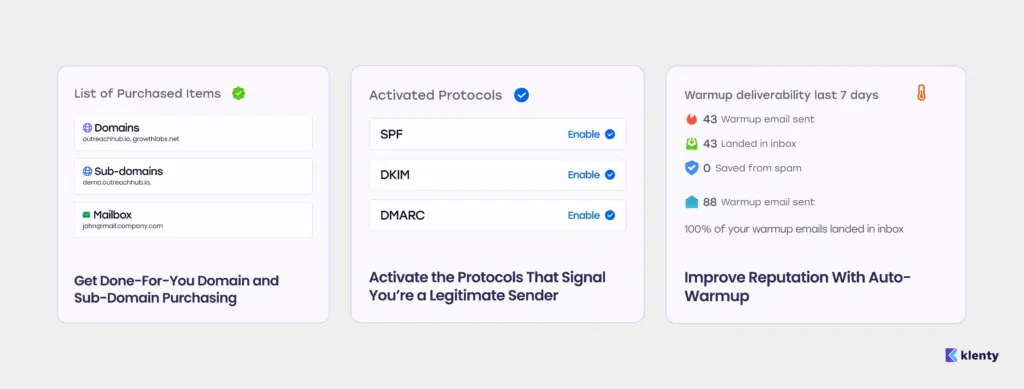
This ensures every outreach profile begins on a fresh, authenticated foundation that protects your sender reputation from day one.
SPF (Sender Policy Framework)
SPF records in your DNS specify which mail servers are authorized to send emails on behalf of your domain. Setting up SPF ensures recipient servers can verify your emails are legitimate, reducing the risk of your messages getting flagged as spam.
DKIM (DomainKeys Identified Mail)
DKIM attaches a digital signature to your outgoing email. This cryptographic signature proves to recipient servers that the content hasn’t been tampered with during transit and that the email genuinely comes from your domain.
DMARC (Domain-based Message Authentication, Reporting, and Conformance)
DMARC works together with SPF and DKIM as an added security layer. It tells recipient mail servers how to handle emails that fail SPF or DKIM checks, helping you prevent spoofing, phishing, and unwanted brand impersonation.
DMARC also provides reporting for greater visibility over who’s sending emails using your domain.
Improve Reputation With Auto-Warmup
Cold email success depends on reputation, and reputation builds gradually. Klenty automates this process through domain-level and inbox-level warmup, ensuring your sender reputation is healthy before SDRs start campaigns, mimicking human sending behavior to maximize deliverability readiness.
2. During Outreach: Ensure SDR Adherence to Deliverability Hygiene
Your deliverability doesn’t just depend on setup; it thrives on daily hygiene. During live outbound campaigns, Klenty ensures your SDRs send safely, smartly, and strategically with features purpose-built to maintain inbox and domain health.
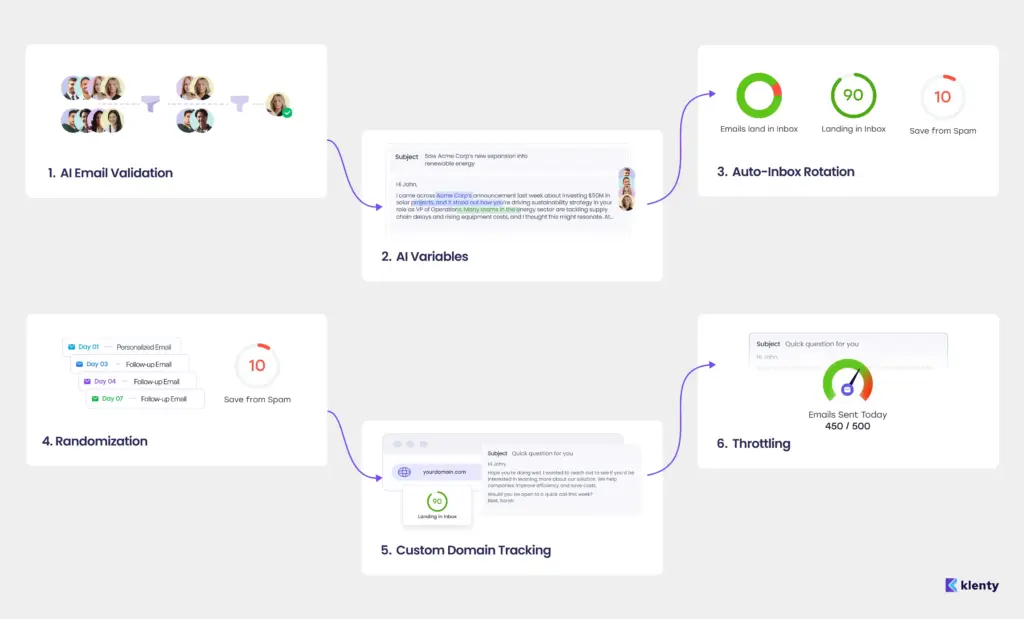
AI Email Validation
Stop sending emails into the void. Klenty validates every address before you hit send with Waterfall Enrichment across 16+ providers, guaranteeing 99% accuracy.
Each verification layer minimizes bounce rates, strengthens your sender reputation, and ensures that every email your SDRs send goes exactly where it should: your prospect’s inbox.
AI Variables
You can’t afford to send cookie-cutter emails. With AI Variables, Klenty inserts AI-personalized copy variations into each email template based on your prospect’s background and research. Every message feels uniquely written, helping SDRs scale personalization without compromising quality, and improving inbox placement through authentic, non-duplicate content.
Auto-Inbox Rotation
Volume is a silent killer of deliverability. With Auto-Inbox Rotation, Klenty automatically spreads your team’s outbound volume across multiple inboxes. This balances daily send loads, minimizes deliverability strain on each domain, and ensures that high-volume teams maintain a pristine sender reputation even during active campaigns.
Randomization
Timing matters, and patterns matter more. To help you stay out of spam filters, Klenty automatically sends emails at irregular intervals, simulating human-like timing and avoiding suspicious, bot-trigger patterns that email providers flag. Randomization keeps your sequences natural, helping you blend into inboxes seamlessly.
Custom Domain Tracking
Tracking links shouldn’t cost you inbox placement. With Custom Domain Tracking, you can send emails using your own branded tracking URLs instead of shared domains, strengthening your domain credibility and protecting message authenticity. This small tweak dramatically boosts Primary Tab delivery across providers.
Throttling
Oversending can hurt even the healthiest domain. Klenty’s Throttling gives you precision control over daily email volume, per SDR or for your entire team, so you never cross provider-imposed limits. These built-in safeguards help maintain stable sending velocities and ensure your emails stay on the right side of spam algorithms.
3. Post-Outreach: Continuous and Rigorous Deliverability Optimization
Optimize, monitor, and maintain your sender reputation even after your emails go live. Klenty ensures ongoing deliverability health across every domain and mailbox.
On-Demand Deliverability Tests
Run instant checks to identify issues affecting inbox placement and ensure your messages consistently land in the Primary Tab.
Dashboards to Track Health and Spam Alerts
Access real-time dashboards that track domain reputation, inbox performance, and spam alerts, so your team stays ahead of any deliverability dips.
Monthly Deliverability Consultancy
Work with Klenty’s deliverability experts who analyze your performance data, audit your domains, and offer steps to maintain peak deliverability month after month.
Resources You’ll Love
Conclusion
Cold email deliverability defines the success of your outreach long before your prospect ever sees your message. Every open, reply, and booked meeting traces back to one question:
Did your email actually reach the inbox?
By setting up the right domain infrastructure, maintaining email hygiene, and monitoring performance consistently, you can ensure your emails always hit the mark.
That’s where Klenty helps you stand out. With advanced deliverability features like AI-powered email validation, auto-warmup, custom domain tracking, and real-time deliverability testing, Klenty gives your team everything needed to protect your sender reputation and maximize inbox placement.
Because when every email lands exactly where it should, in the Primary Tab, you’re not just improving metrics. You’re unlocking every opportunity your outbound strategy was built to create.
If Cold Email Is a Key Outbound Channel, Deliverability Is Your Unfair Advantage. Get your emails into prospects' inboxes with Klenty.
Frequently Asked Questions
1. What is cold email deliverability?
2. Why is cold email deliverability important?
3. How many cold emails should I send per day?
1. New inboxes: start with 10–20 cold emails per day.
2. Established inboxes: gradually scale up to 80–100 emails per day maximum.
Sending high volumes too fast can harm your domain health and reduce deliverability.
4. How can Klenty help improve cold email deliverability?
1. Sets up SPF, DKIM, and DMARC authentication.
2. Warms up domains and inboxes automatically.
3. Validates recipient emails across 16+ providers.
4. Randomizes sending patterns and distributes volume across multiple inboxes.
5. Tracks domain health and spam alerts via real-time dashboards.
With Klenty, your emails always have the best chance of landing in your prospect’s inbox.
About the Author