Are You Wasting Hours on Outbound Busywork?
If you’re in sales today, there’s a good chance you’re caught in the same cycle as thousands of SDRs: spending hour after hour dialing numbers by hand, chasing contact info, updating CRMs, and researching accounts before every call, only to have most of those calls go unanswered or end in quick rejections.
Cold calling, especially, can feel like a grind: prospects don’t pick up, voicemails are never returned, and every hang-up chips away at your motivation.
It gets worse. Stuck with generic numbers, mis-timed calls, or tools that can’t keep pace, you’re left fighting low connection rates and endless admin burden, leaving little time for the actual work of selling.
There’s no easy way to batch calls by location or time zone, no smooth way to get insights on your pitch, and every rejected call starts to sting a little more.
Many SDRs end up dreading their cold calling sessions. The constant friction, from mountains of manual work to repeated rejections turns even the most ambitious reps into skeptics.
Also, follow-ups are manual, reps must interpret notes, remember timelines mentioned on calls, update CRM fields, write follow-up emails, and track renewal periods themselves. Critical next steps often slip through the cracks, accounts get over-contacted or under-contacted, and pipeline generation suffers.
It’s no surprise that burn-out runs high when you’re stuck in this holding pattern, knowing you should be spending your energy having real, productive conversations, but always fighting uphill just to get one person on the line.
What if you could finally remove those barriers?
What is a Sales Dialer ?
A sales dialer is an automated calling tool that simplifies the entire outbound process for sales teams. It automatically dials each number from a contact list, connects reps to prospects as soon as they answer, drops pre-recorded voicemails when needed, and tracks all call outcomes and metrics in real time.
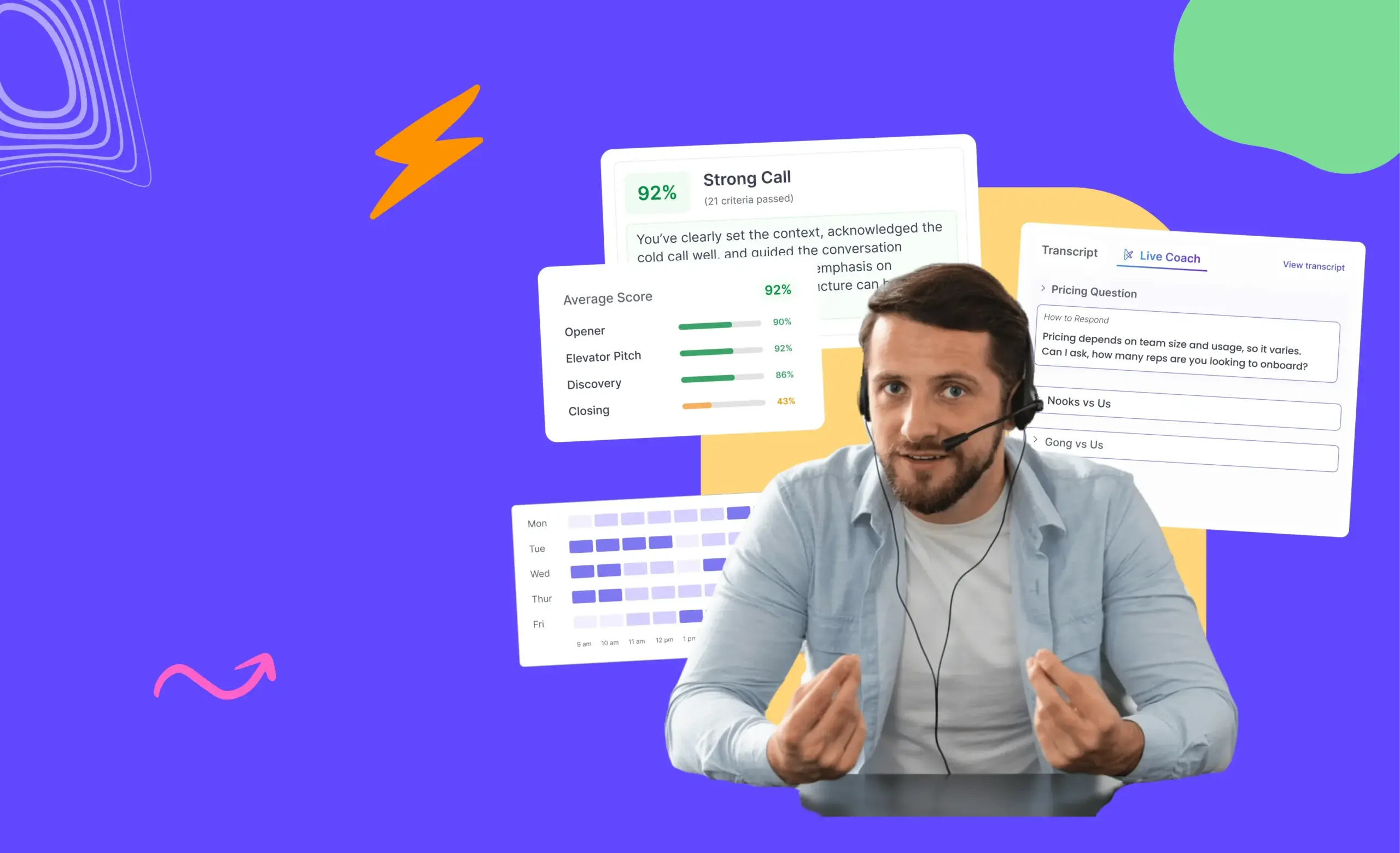
AI listens to your sales conversations, understands what was discussed on call, and creates the next task for follow-up after the call. This way, reps can keep their momentum, execute the right tasks at the right time.
By eliminating manual dialing and logging, a sales dialer frees reps to focus on live conversations, making outreach faster, more efficient, and data-driven.
What Are the Key Features to Look For in a Sales Dialer?
When choosing a sales dialer, you should look for features that will help you increase productivity, improve connect rates, and make your life easier. Here’s what matters most:
- AI Power dialer: Automatically call one number after the next on your list, so you can move quickly and maintain a steady outreach rhythm, no more manual dialing or wasted seconds between calls.
- AI Parallel dialer: Simultaneously call multiple leads at once, instantly connecting you to whoever picks up first, perfect for maximizing call volume and connect rates during high-velocity call blocks.
- Automatic Dialing: Eliminates manual work, speeds up your workflow, and helps you reach more prospects each day.
- AI-Based Next Step Execution: AI listens to your sales conversations, understands what was discussed on the call, and intelligently generates the next action. It creates follow-up tasks automatically after each call, drafts personalized follow-up messaging, and surfaces the right action at the right time so reps can focus on dialing and executing the right tasks efficiently.
- CRM Integration: Connects directly with your CRM, letting you pull up contact details and log call outcomes without switching tabs or doing extra data entry.
- Local Presence Dialing: Lets you display a local number on the caller ID, which increases the chance of your calls being answered and reduces spam complaints.
- Voicemail Drop: Enables you to leave personalized, pre-recorded voicemails instantly, boosting your follow-up rates and saving time.
- Call Recording & Analytics: Provides in-depth insights on talk time, connection rates, and outcomes for every rep, so you can optimize your sales strategy and coach your team toward better results.
- AI-Powered Features: Modern dialers now include AI-driven transcription, conversation analysis, and even on-call coaching, helping you hit your goals faster.
- Call Scripting: Gives you real-time guidance and scripts to handle objections and stay consistent, even if you’re new to sales.
- Automatic Call Logging: Saves every call note and outcome automatically, reducing admin work and keeping your data accurate.
How Does a Sales Dialer Work?
1. Select Your Dialing Mode:
Choose between Parallel Dialer (call up to 5 prospects at once for cold lists), Power Dialer (call your entire list sequentially with one click), or Click- to- call (call one prospect at a time for high-personalization and research-backed follow-ups).
2. CRM Dialing and Preparation:
Initiate calls directly from your CRM, keeping all prospect details, scripts, and research at your fingertips, no tab switching or lost data.
3. Automatic Local Presence:
Enable local dialing so prospects see a familiar area code, boosting pickup and trust for each call.
4. Call Connection & Handling:
When a call connects, all key prospect info appears, if unavailable, the call forwards to a teammate so no opportunity is lost.
AI listens to your call, understands what was discussed on the call, and intelligently generates the next action. Follow-up tasks are created automatically, so reps don’t have to manually schedule the next steps, draft emails, or track timelines.
5. Voicemail Automation:
For unanswered calls, use automatic voicemail drop to instantly leave a pre-recorded message without waiting for the beep.
6. Live Call Support & Analytics:
Calls are transcribed and summarized by AI, with notes auto-synced to your CRM for up-to-date records.
7. Review and Optimize:
Access detailed call analytics and use them to refine outreach strategies, scripts, and rep coaching for continuous improvement.
What are the Types of Sales Dialers, and When Should You Use Each?
Choosing the right sales dialer isn’t just about speed; it’s about how well your tool fits your workflow, scales with your volume, and keeps you focused on genuine pipeline activity.
Here’s what you need to know about each major dialer category before you decide.
1. Multimode Sales Dialer (Power, Parallel, Click-to-Call)
Multimode dialers deliver true flexibility, letting you switch calling strategies instantly depending on your outreach goals. You can move from a high-speed power session to a focused, personalized pitch, all without leaving your main workflow.
AI Power Dialer
The AI Power Dialer automatically dials a list of prospects, one after another, with zero manual input required after you start the session. You set the pace, and as soon as a call ends (or goes to voicemail), the next number is dialed.
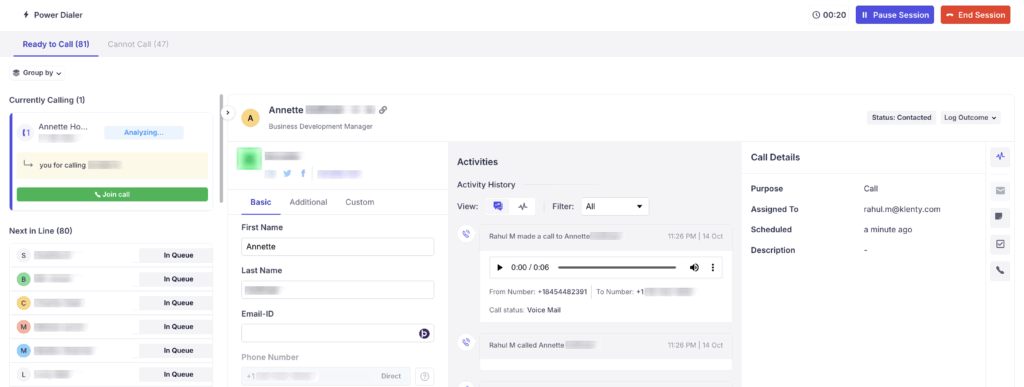
Features:
- Start a whole session with one click, no reloading, no list fumbling.
- Save 2–3 hours per week on dialing alone by eliminating manual number entry.
- Drop pre-recorded voicemails without waiting for the beep.
- Local presence dialing uses area codes your prospects recognize, boosting pickup rates.
- Every call is logged and transcribed automatically to your CRM for best-in-class reporting and analysis.
- After calling, you see detailed breakdowns of your total dials, connects, talk time, and meetings booked
- AI listens to your sales conversations, understands what was discussed on call, and intelligently generates the next action.
AI Parallel Dialer
The AI Parallel Dialer lets you call multiple prospects at once (for example, up to five prospects simultaneously). This is a game-changer for high-volume outbound or when connect rates are low.
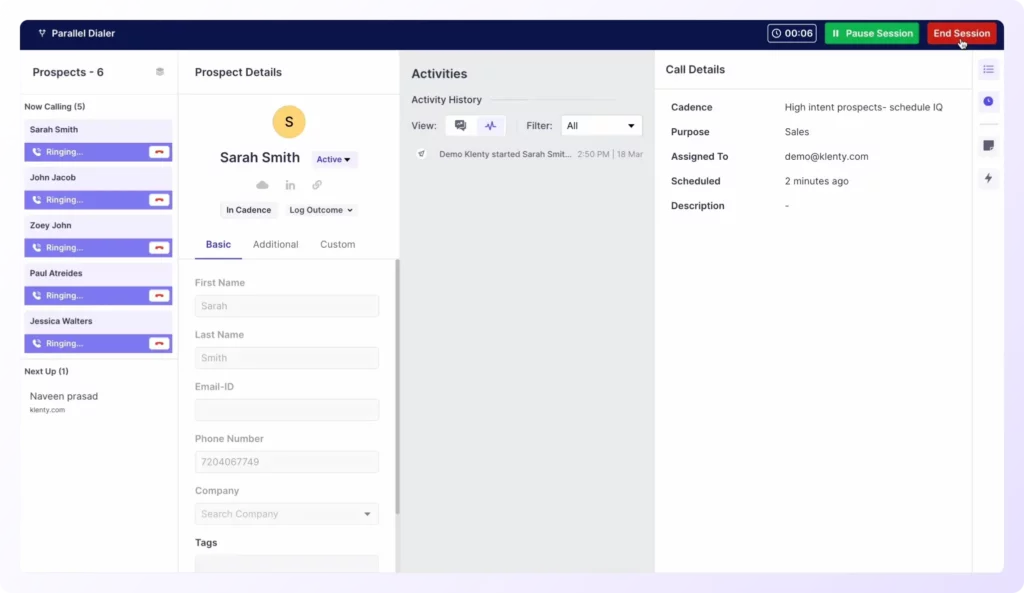
Features:
- Dial several numbers at once to maximize your total daily connects, skipping unanswered lines automatically.
- Best for cold lists and campaigns where speed is more important than deep personalization.
- Reduces idle time to nearly zero; you always get pushed to the next live call, not voicemail.
- Instantly drop voicemails to all missed calls, increasing your touchpoints while you speak with live answers.
- AI listens to your sales conversations, understands what was discussed on call, and intelligently generates the next action.
Click-to-Call Dialer
With Click-to-Call, you launch calls directly from within your CRM or sales engagement platform with a single click.
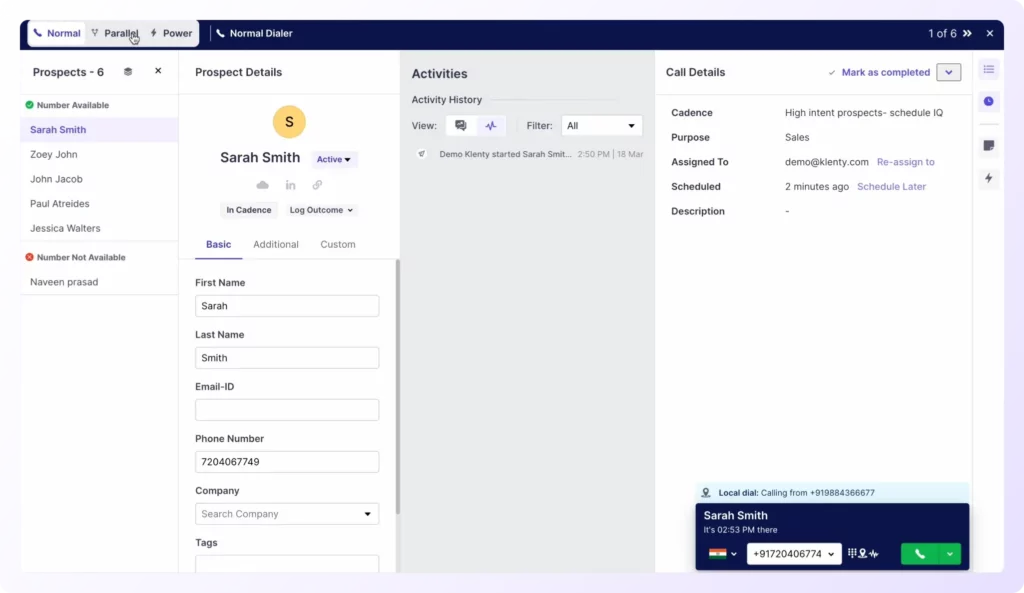
Features:
- All prospect info, past interactions, scripts, and notes are right at your fingertips, ideal for high-quality, targeted outreach.
- Choose your call moment: Review background, tweak your script, and reach out when you’re truly ready.
- Great for newer reps or for niche accounts where every conversation deserves preparation.
- Every Click-to-Call is logged and available for analysis and future follow-up, helping you refine your approach over time.
- AI listens to your sales conversations, understands what was discussed on call, and intelligently generates the next action.
Cons:
- As powerful as multimodal dialers are, problems crop up when they’re not fully integrated with your sales engagement platform. The moment your dialer stands alone, you’re forced back into old admin habits: exporting call data to spreadsheets, manually updating campaign outcomes, and juggling multiple tabs just to track activity.
- This disconnect breaks your rhythm, delays follow-ups, and hides account progress from everyone but the caller. Without direct integration, pipeline activity visibility plummets, and your SDRs end up squandering valuable time on manual, non-revenue work, instead of driving real conversations and booking more meetings.
2. Standalone Dialers
Standalone dialers are built around just one dialing method, like only Power Dialer or only Click-to-Call. You’re locked into that singular way of working, without the flexibility to adapt your approach to the needs of different campaigns or prospect lists.
For example, if you start your day cold calling and need volume (AI Power/AI Parallel Dialer), but then want to switch to a personalized follow-up (Click-to-Call), you’re forced to log out, open another tool, or change your workflow entirely.
Features:
- Auto-dialing through lists using one set pattern (Power or Predictive).
- Call recording and basic playback for quality assurance.
- Disposition codes after each call to tally results.
- Simple reports on total dials, connects, and average talk time.
- Some support basic voicemail drop or call transfer, but customization is often limited.
Cons:
- Only one dialer mode is offered; you can't dynamically switch between power, parallel, or click-to-call, limiting your ability to tailor outreach for different lead stages.
- The lack of flexibility forces teams to buy and learn multiple tools if they want to cover every scenario, increasing costs and complexity.
- On top of this, these tools often lack engagement automation and CRM sync, meaning your pipeline activity and engagement strategy become fragmented and inefficient.
3. CRM Dialers
CRM Dialers integrate tightly with your CRM.
Every call, note, and follow-up can be attached to timelines, keeping your full activity stream transparent.
Features:
- One-click dialing from contact and opportunity records, with automatic call logging and recording.
- Personalized call scripts or next-best-action popups based on CRM field data.
- Schedule follow-up reminders linked to pipeline stages, preventing prospects from falling through the cracks.
Cons:
- Most CRM dialers limit speed, only replicating click-to-call or manual dialing, no true parallel or predictive dialing.
- Advanced features (AI summaries, call scoring, coaching suggestions) may be missing, and workflow customization options are often limited.
- If your outbound requires high call volume, you may find this too slow or lacking in queue management and workflow automation.
4. Integrated Sales Engagement Platform + Sales Dialer
This is the gold standard: full-featured sales engagement software with built-in multimodal dialer, campaign automation, analytics, and AI productivity engines, like Klenty.
Depth of Integration:
- Moves you between emails, calls, tasks, and LinkedIn touches without tab-hopping or copy-paste admin.
- AI agents assist with list building, cadence schedule, research, call summary, and prospect prioritization for every rep.
- Reps can switch dialing modes mid-campaign, follow up using advanced sequences, and leverage NLU-driven coaching or objection handling.
Pros:
- Full pipeline activity focus: See every prospect’s journey and status, automate reminders, and reduce no-shows.
- Single source of metrics for reporting, no more reconciling data from 5 different tools.
- Reduces SaaS sprawl: Lower overall cost and fewer system conflicts or sync errors.
- Every activity is tracked and coached, so SDRs progress faster and ramp sooner.
- AI listens to your sales conversations, understands what was discussed on the call, and intelligently generates the next action.
Klenty is a complete outbound engine, built to automate every repetitive step so you focus purely on connecting and converting. Klenty’s multi-mode sales dialer lets you choose Power, Parallel, or Click-to-Call based on your dialing volume, connect rates, and the level of engagement you want, without ever switching platforms.
You never have to worry about manual CRM data entry, messy exports, or losing context between calls. Klenty deeply integrates with your CRM and centralizes your sales engagement, prospect research, call notes, and analytics under one roof. Every sync happens instantly, so pipeline activity is always visible and up to date.
| Dialer Type | What Does It Do for You? | When Should You Use It? |
|---|---|---|
| AI Power Dialer | Automatically dials your call list, one after another, letting you focus only on talking to prospects, not manual work or wasted seconds. | When you want to reach more prospects in less time, break into new markets, or give yourself maximum pipeline-building time with fewer distractions and higher energy. |
| AI Parallel Dialer | Let's you call up to 5 prospects at once, instantly connecting you to the first person who picks up, so you never stall waiting for live connects. | When your goal is to maximize daily conversations, skip over bad numbers automatically, or attack huge lists so you cover more ground and increase your booked meetings. |
| Click-To-Call Dialer | Gives you complete control, just one click from your CRM, and you're talking, with all prospect info ready to help you personalize every call. | Perfect if you're newer to cold calling, following up after prior interactions, or working on niche lists where every conversation counts and you want to set your own pace. |
Why Is Klenty the Right Fit for You?
If you’re searching for a sales dialer that can finally eliminate busywork and help you build a real pipeline, Klenty is designed exactly for you.
Most platforms keep you stuck in manual work, but with Klenty, you give yourself a true outbound advantage, powered by a team of AI agents working on your behalf every step of the way.
With Klenty’s sales dialer, you transform how you connect with prospects by using three high-output dialer modes in one platform:
- Use the AI Parallel Dialer to blitz through huge lists, calling up to five prospects at once so you never miss a live connect.
- The AI Power Dialer helps you stay sharp, dialing one after another, maximizing your talk time, and keeping your momentum high.
- With 1-Click-to-Call Dialer, you gain total control for your most important conversations, prepping in your CRM, and dialing instantly when you’re ready to personalize your pitch.
But that’s not all. Klenty’s AI-powered outbound engine goes beyond what you’ve seen before:
- Action AI listens to your sales conversations, understands what was discussed on the call, and intelligently generates the next action. It creates follow-up tasks automatically, drafts personalized follow-up messaging, and surfaces the right action at the right time so reps can focus on dialing and executing the right tasks efficiently.
- AI agents handle list-building, research, and transcribe notes, so you can approve outputs and focus only on booking meetings and building relationships.
- CRM integrations mean every interaction, update, and outcome is instantly recorded, no switching tabs, no manual data entry.
- Voicemail drops and local presence dialing maximize your call-back rates, while AI-powered call summaries help you capture everything that matters and act fast.
- Talk Track Tables ensure reps stay on-script, handle objections smoothly, and bring consistency to every pitch and call.
With all these features working together, cold calling changes. Manual admin and missed details aren’t a worry, each call is backed by context and live coaching, and every outcome is tracked without any extra work.
SDRs stop feeling stuck or frustrated; instead, they are more prepared, more focused, and start to see improvement in their results. It’s not just easier to meet targets, day by day, reps see their calls matter and their confidence grow. That’s the difference Klenty delivers.
Ready to experience the shift? Book a demo of Klenty’s sales dialer and see how true outbound effectiveness feels in action.
FAQs
What are the recommended sales dialer integrations for lead management and tracking?
What are the average monthly costs for a sales dialer software subscription?
Which sales dialer offers the best value for money for a team of 5 sales representatives?
Is sales dialer software secure for customer data?
Do sales dialers work globally for outbound calling?
About the Author